

![Washington B&O Tax: Classification, Rates & Filing Guide [2026 Edition]](https://www.cpapilot.com/blog/wp-content/uploads/2026/05/Washington-BO-Tax-.png)

AI Client Organizers for CPAs – Cut Tax Season Bottlenecks in 2026

[Last Updated on 2 months ago]
Have you ever wondered what an AI client organizer for CPAs is, and why it matters during tax season?
An AI client organizer is a tax intake questionnaire built from a client’s prior-year tax return, so each question connects to a specific form, schedule, deduction, carryforward, income source, or filing detail already present in the client file.
TL;DR: How AI Client Organizers Improve Tax Intake for CPAs
- AI client organizers replace generic tax questionnaires with return-based, client-specific intake workflows
- Firms can reduce intake time by up to 44 minutes per client and cut follow-ups by nearly 70%
- Completion rates improve significantly, helping shift work out of the March bottleneck
- The system flags missing documents, year-over-year changes, and carryover items early
- Works best for recurring clients; first-year and complex cases still need CPA review
- Integrates with existing tax software like Drake, Lacerte, UltraTax, and ProSystem fx
- Supports faster preparation, cleaner data collection, and better client communication
For CPAs and EA firms, that means replacing a generic organizer with a return-based intake workflow that is more relevant, easier for clients to complete, and more useful for preparation.
For recurring clients, this changes the purpose of tax intake.
Instead of asking broad questions that the firm already answered on the prior-year Form 1040, Schedule C, Schedule E, K-1, or retirement contribution worksheets, the organizer focuses on
- The tax items that changed,
- The missing client documents, and
- The return details that need confirmation before tax preparation begins
That improves data collection, reduces intake friction, and helps firms identify missing documents, life-event changes, estimated tax payments, passive activity issues, and carryover items earlier in the filing season.
AI client organizers work even better when paired with structured AI tax research workflows that help firms validate issues surfaced during intake.
That kind of workflow improvement matters in a tax environment that is already highly digital:
The IRS reported 97,969,000 total e-filed returns received for the filing season statistics released for the week ending April 3, 2026, including 52,773,000 e-filed returns submitted by tax professionals. (Source)
This guide explains how AI client organizers work, how they fit into an existing CPA workflow, where they reduce intake time, and where preparer review still matters.
The easiest way to understand the value of this workflow is to look at the intake problems most firms already have.
Table of Contents
- Why Traditional Tax Organizers Break Down for CPA Firms?
- How AI Client Organizers Use Prior-Year Tax Return Data?
- AI Client Organizer Examples by CPA Client Type
- How Much Time Can AI Client Organizers Save?
- How AI Client Organizers Integrate with Drake, Lacerte, UltraTax, and ProSystem FX?
- Where AI Client Organizers Still Require CPA Review?
- AI Client Organizer Data Security, IRC §7216, and Compliance
- Common Mistakes CPA Firms Make with AI Client Organizers
- Next Steps for CPA Firms Using AI Client Organizers
- AI Client Organizers FAQS
Why Traditional Tax Organizers Break Down for CPA Firms?
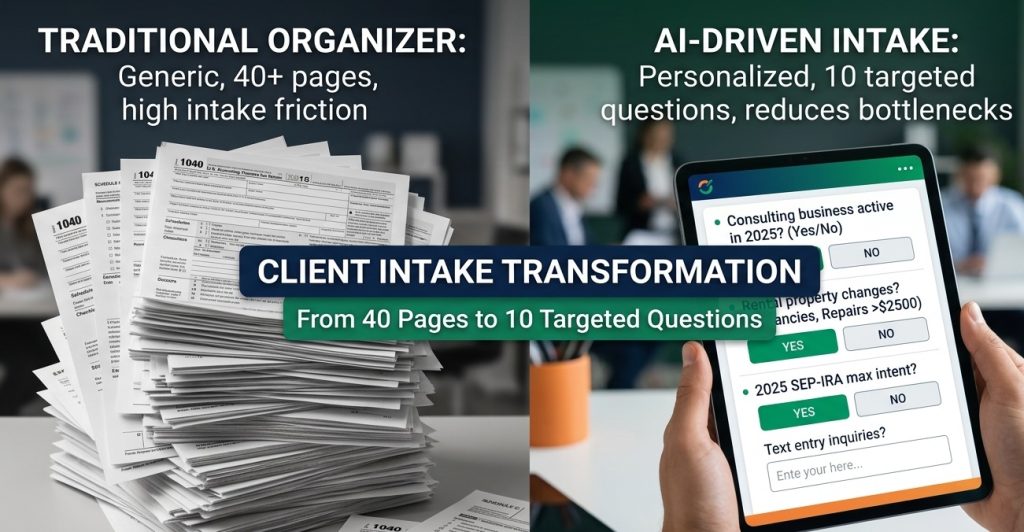
Most tax organizers are still built as templates. Tax software like Drake, Lacerte, UltraTax, and ProSystem fx generates a standard packet, pre-fills a few demographic details from the prior year, and sends it to the client.
The organizer is broad by design because it has to cover many filing scenarios, including farm income, foreign accounts, K-1s, HSA contributions, cryptocurrency activity, rental real estate, and more.
That broad coverage is exactly where the problem starts.
When a client opens a 40-page PDF, and the first several pages contain questions that do not apply to their return, one of three things usually happens.
- They skim and miss the questions that actually matter.
- They sent back last year’s documents with a “same as last year” note. Or
- They complete a few sections and call the firm to ask what they really need to provide.
Those calls slow down the intake process, and the “same as last year” response creates compliance risk because it is rarely fully accurate.
There is also a second problem that firms do not always say out loud: traditional organizers often ask clients for information that the CPA already has.
If the firm prepared the prior-year return, it already knows the client had a Schedule C consulting business, two rental properties, and a SEP-IRA contribution.
The real intake issue is not whether those items existed. It is whether the business changed, whether the rental properties had repairs or improvements, whether estimated tax payments were made, and whether the client wants to repeat or adjust the same retirement strategy.
Reducing repetitive intake follow-up also supports the larger goal of how accounting firms can prevent burnout this tax season.
That is why generic organizers create unnecessary friction. They are built to ask everything, when the real purpose of tax intake is to identify what changed, what is missing, and what needs confirmation before tax preparation begins.
How AI Client Organizers Use Prior-Year Tax Return Data?
The workflow is straightforward. The AI reviews the client’s prior-year tax return, not just demographic details, but the full return, and uses that information to generate a client-specific tax organizer.
Each question is tied to a form, schedule, income item, deduction, carryforward, or payment detail that already appeared on the prior-year filing.
That changes the role of the organizer. Instead of asking broad intake questions that apply to every taxpayer, the organizer asks targeted follow-up questions based on what the client actually reported last year.
This is one practical example of how agentic AI for tax and audit professionals can handle repeatable workflow steps without replacing professional judgment.
For a consulting client with two rental properties, the AI-generated organizer might include prompts like these:
- Schedule C confirmation: “Last year, your consulting business reported $187,400 in gross receipts and $42,100 in expenses. Did the business continue in 2025? Were there any material changes to revenue or expense categories?”
- Rental property detail: “You reported two rental properties: 47-12 Northern Blvd and 21-08 Queens Blvd. Were there any vacancies, rent changes, capital improvements, new appliances, or repairs over $2,500?”
- Retirement contribution follow-up: “Your 2024 SEP-IRA contribution was $34,200. Do you intend to contribute the maximum again for 2025?”
- Estimated tax payment recap: “You made four estimated tax payments in 2024 totaling $28,000. Please confirm the dates and amounts of your 2025 payments.”
Compare that with a generic question such as: “Did you own any rental real estate in 2025? If yes, please complete the attached rental property schedule.”
The first version tells the client exactly what needs attention. The second relies on the client to remember every relevant detail on their own. That difference is what makes AI client organizers more useful for recurring-client tax intake.
AI Client Organizer Examples by CPA Client Type
This is where the workflow becomes more useful in practice. No two recurring clients need the same organizer, because no two prior-year returns carry the same forms, schedules, income sources, deductions, or follow-up issues.
When prior-year return data is combined with forward-looking planning, firms can also use AI for tax projection to move beyond intake and into proactive advisory work.
The value of an AI client organizer is that it adjusts the intake questions to fit the client’s actual filing history instead of sending the same packet to everyone.
1. AI Organizer for W-2 Clients
These clients often need fewer than 10 meaningful data points.
A tailored organizer might ask whether the client is still employed with the same employer, whether they received any additional W-2s, and whether they had taxable investment sales beyond ordinary dividends and interest.
If nothing changes , the entire organizer may only take a few questions.
Our shortest AI organizer last season was three questions long for a retired client whose only income was Social Security, a pension, and a small RMD from a traditional IRA.
Compare that to the 38-page organizer the client used to receive and immediately ignore.
2. AI Organizer for Self-Employed and Schedule C Clients
These clients need a much more detailed intake workflow.
The organizer can pull the prior-year Schedule C by line and ask about the categories that mattered last year, including gross receipts, advertising, depreciation, supplies, and contract labor. That makes the questions easier for the client to answer because they do not have to guess which expense categories apply.
For Schedule C clients, intake questions often connect directly to issues covered in our guide to small business tax deductions.
The AI can also flag large year-over-year changes for follow-up. If advertising increases from $4,200 to $18,400, the organizer can ask for an explanation before the preparer has to chase it manually. That is the same question a good CPA would ask later, but asking it during intake saves time and reduces back-and-forth.
3. AI Organizer for Rental Real Estate Clients
For multi-property landlords, the organizer can be built property by property using the prior-year Schedule E.
Each property gets its own section with the address, prior-year income and expense categories, and a focused question around rent changes, vacancies, repairs, capital improvements, or new depreciable assets.
The AI can also flag suspended passive losses under IRC §469 and ask whether the property was sold or whether passive income from another source could affect the release of those losses.
That is something a generic organizer will never catch because a generic organizer does not know the client had suspended passive losses in the first place.
For firms serving landlords and investors, this intake workflow can complement broader AI for real estate tax planning processes.
4. AI Organizer for Pass-Through Owners and K-1 Recipients
For pass-through clients, the organizer can create one section for each prior-year K-1.
That allows the client to confirm whether each entity is still active, whether ownership changed, and whether any partnership, S corporation, or trust interest was sold, dissolved, or restructured. For clients with multiple K-1s, this alone can eliminate a significant amount of back-and-forth later in the season.
If ownership structure changes come up during intake, firms may also need to revisit S-Corp vs C-Corp vs LLC planning questions.
5. AI Organizer for Clients with Brokerage Accounts
The organizer can also adapt to prior-year investment activity.
If prior-year 1099-B reporting showed wash sales, capital loss carryovers, foreign tax credits or Section 1256 contracts, the organizer can ask whether those same patterns continued. A client with a $22,000 long-term capital loss carryforward, for example, should see that issue reflected in the organizer instead of being asked only broad investment questions.
This is also a good point to confirm whether related planning issues, such as the SALT deduction, may affect the return.
For higher-income clients with investment activity, organizer questions may also lead to planning around the alternative minimum tax (AMT).
6. AI Organizer for Clients with Prior-Year Life Event Flags
This is often the highest-value customization layer.
If the preparer documented a likely event in the prior year, such as a home sale, college expenses, a retirement transition, or expected 529 withdrawals, those notes can drive the next year’s organizer questions.
Instead of relying on memory, internal sticky notes, or scattered file comments, the organizer carries those issues forward into the intake process.
That is where the workflow becomes more than automation. It becomes a better system for continuity.
How Much Time Can AI Client Organizers Save?
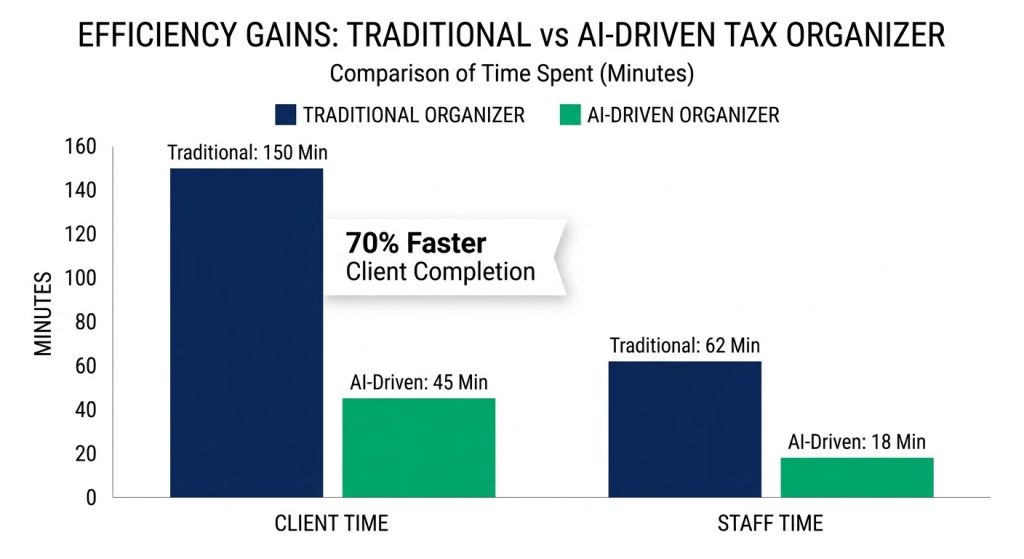
Internal tracking from one 2025 early tax-season intake workflow, covering January through mid-February, showed meaningful efficiency gains. These figures should be treated as sample-firm results rather than universal outcomes for every CPA firm, but they show where time savings can appear in a recurring-client intake process.
| Metric | Traditional Organizer | AI-Generated Organizer | Delta |
|---|---|---|---|
| Avg. organizer length (pages) | 38 | 6-14 (varies by client) | -65% |
| Avg. client completion time (self-reported) | 2.5 hours | 45 minutes | -70% |
| Client completion rate (returned by Feb 15) | 52% | 78% | +26 pts |
| Follow-up calls/emails needed per client | 3.4 | 1.1 | -68% |
| Preparer intake time per client | 62 min | 18 min | -44 min |
| Organizer questions left blank | 41% | 8% | -33 pts |
The most important metric for firm capacity was preparer intake time. A 44-minute reduction per client across 640 individual returns translated into roughly 469 hours of recovered staff time during the most capacity-constrained part of the season.
At a blended preparer cost of $165 per hour, that represented approximately $77,400 in recovered capacity. More importantly, it shifted staff time away from repetitive intake follow-up and toward higher-value preparation and review work.
The completion-rate improvement may be even more important than the raw time savings. Moving from a 52% return rate by February 15 to 78% means more organizers come back earlier, allowing firms to begin preparation sooner and move work out of the March bottleneck.
That is where the operational benefit becomes real. Saving time on tax filing only matters if it improves the filing-season timeline and reduces deadline pressure.
How AI Client Organizers Integrate with Drake, Lacerte, UltraTax, and ProSystem FX?
Most CPA firms are not looking to rebuild their entire tax intake process, especially during the busiest part of the filing season.
The most practical implementation model is the one that keeps the existing engagement letter, client portal, document collection, and deadline workflow in place, while inserting the AI organizer into the middle of that process.
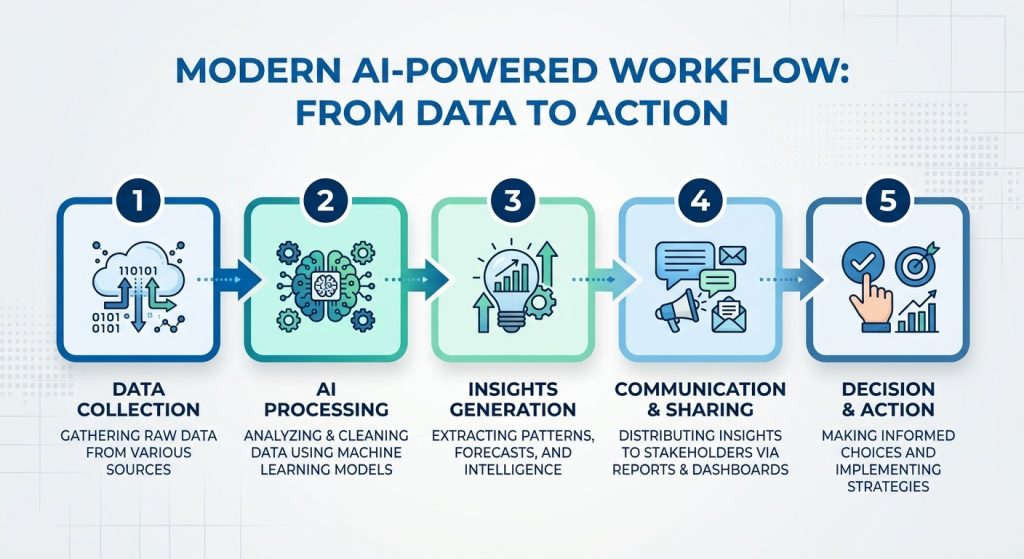
In other words, the goal is not to replace the firm’s tax software or client communication system. The goal is to improve the intake step that happens before tax preparation begins.
Step 1: Upload the Prior-Year Tax Return
The prior-year tax return is uploaded into the organizer generation tool. In many firms, those files already sit inside a document management system, so this is often a batch process rather than a manual step for each client.
Step 2: Generate and Review the AI Organizer
The AI generates a client-specific organizer based on the prior-year return. Before sending it to the client, a preparer or admin team member usually spends about 60 to 90 seconds reviewing it to confirm that prior-year notes were pulled in correctly and that nothing looks obviously incomplete or out of place.
If the client is already known to have a major life event, such as retirement, a business sale, or marriage, the firm can add one or two custom questions before sending the organizer. The system can only work from the information already documented in the file.
Step 3: Send the Organizer Through the Existing Client Portal
The completed organizer is delivered through the firm’s current client portal and engagement workflow. That means clients do not need to learn a new system, and firms do not need to replace their existing delivery process.
Step 4: Route Responses Into Tax Preparation
Because the questions were built from the prior-year return, the client’s responses tend to be more specific and easier to interpret during preparation. That reduces vague answers, shortens clarification follow-ups, and makes intake review cleaner for staff.
Step 5: Flag Missing Information for Follow-Up
If the client leaves items blank, the AI can generate a targeted follow-up list based on what is missing. Instead of a generic reminder, the firm can send a more specific request, such as:
“We still need the 1099-DIV from Fidelity and confirmation of your 2025 SEP contribution amount.”
That kind of follow-up is faster for the firm and clearer for the client.
What does not change is just as important. The engagement letter process, fee collection, tax preparation software, review workflow, and e-file steps all stay the same.
The AI organizer improves one part of the intake process without requiring the rest of the system to be rebuilt, which is why it fits naturally alongside other time-saving tax workflows for CPAs.
Where AI Client Organizers Still Require CPA Review?
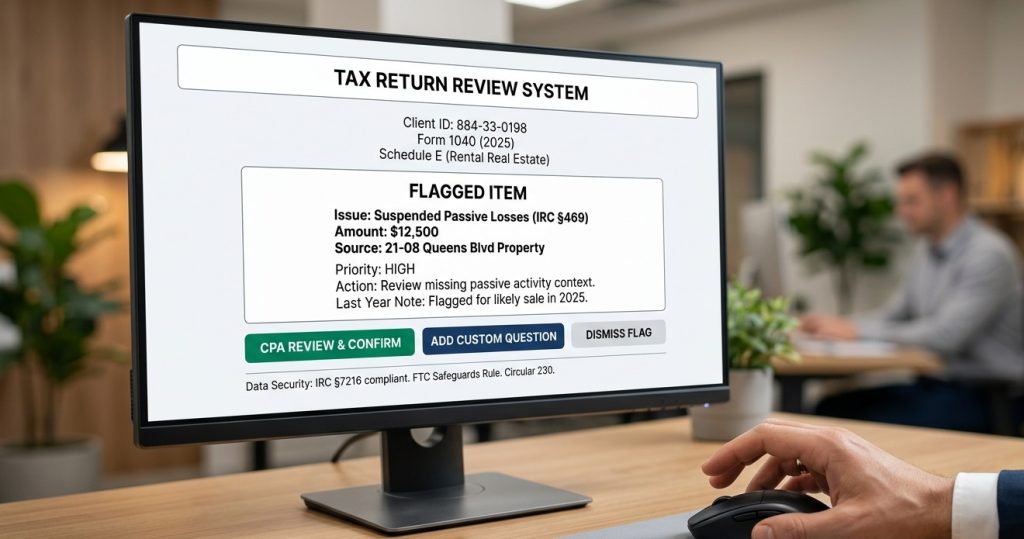
AI client organizers work best for known prior-year facts, not independent interpretation of new or unusually complex circumstances.
A few limitations are worth understanding before a firm builds too much of its intake process around automation.
- First-year clients
First-year clients do not benefit much from this workflow because there is no prior-year return to use as a baseline. In those cases, the firm still needs a traditional onboarding questionnaire, document request checklist, or custom intake process. AI client organizers are most useful from year two onward, when the system has a prior return to work from.
- Clients with major life changes
The prior-year return is a weak predictor when the client has gone through a major change such as divorce, retirement, a business sale, an inherited IRA, or a move to a new state. The AI can still generate an organizer, but the preparer should add custom questions for the new facts before sending it to the client.
A practical safeguard is to flag those clients for manual review before the organizer goes out.
- Clients who changed firms
If the firm only has the prior-year return, but not the preparer notes, email history, planning memos, or review context from the prior preparer, the organizer will still be useful, but incomplete. It can identify return-based items, but it may miss the softer issues that usually live in the file rather than on the tax return itself.
- Clients with Complex Entity Structures
For high-net-worth clients with trusts, foreign accounts, tiered entities, and multiple K-1s from interconnected partnerships or S corporations, the organizer should be treated as a starting point. It can help structure intake, but it does not replace a more customized review of the client’s filing position and document flow.
- Crypto-heavy Clients
Digital asset activity is one area where human review still matters heavily, especially for firms also dealing with cryptocurrency tax reporting for CPAs. Wallet transfers, cost basis tracking, staking, DeFi transactions, and incomplete 1099-DA reporting can create intake questions that require more judgment than a prior-year-return-based workflow can reliably provide. In those cases, the AI organizer can still support intake, but the crypto-specific questions should usually be reviewed or shaped by a preparer before release.
The practical takeaway is that AI client organizers work best when the prior-year return is a strong predictor of the current-year intake. When the client has new facts, missing context, or unusually complex activity, CPA review still needs to lead the process. One of the fastest ways to misjudge this tool is to expect it to replace your entire intake process. It won’t. Here’s the honest split.
What AI Client Organizers help with:
- Eliminating generic questions that don’t apply to a specific client
- Anchoring every prompt to a form, schedule, or line item from the prior-year return
- Flagging year-over-year anomalies (expense categories that jumped 30%+, suspended passive losses under IRC §469, carryover items)
- Pulling forward preparer notes and life-event flags from the prior year
- Raising pre-February completion rates so prep work shifts out of the March crunch
- Generating targeted follow-up lists instead of generic “please complete” reminders
- Making junior preparers’ intake review faster because the AI surfaces what has changed
The takeaway: AI client organizers reduce the mechanical workload of intake for recurring clients. They do not replace the preparer’s judgment, the firm’s engagement process, or the compliance obligations that attach to the preparer, regardless of how the data was gathered.
AI Client Organizer Data Security, IRC §7216, and Compliance
Any AI organizer tool that ingests a prior-year tax return is handling taxpayer data. That means firms need to evaluate it through the lens of IRC §7216, Circular 230, the AICPA Code of Professional Conduct, and the FTC Safeguards Rule.
This is not just a technology question. It is a tax-data-use and compliance question.
Before adopting any AI client organizer, firms should confirm the following:
- The vendor’s contract and workflow are consistent with IRC §7216 and the related regulations. Some return-preparation and auxiliary-service uses may be permitted without separate consent under Treas. Reg. §301.7216-2, while other uses require specific written consent under Treas. Reg. §301.7216-3. You can reference the official IRS and Treasury rules here for support.
- If the vendor is an Authorized IRS e-file Provider, its data handling should align with IRS Publication 1345 safeguarding expectations.
- The firm has written clarity on how client data is used, including whether it is retained, disclosed, or used to train broader AI systems.
- The firm’s Written Information Security Plan covers the tool, as required under the FTC Safeguards Rule for covered tax professionals.
- Security and compliance claims are independently verified before being repeated internally or in client-facing materials. SOC 2 Type II or similar assurance may be a useful diligence item, but it is not a substitute for reviewing the actual contract and data-handling terms.
This is not a “nice to have” review. A tool that improves organizer efficiency still needs to fit inside the firm’s confidentiality, disclosure, and safeguarding obligations.
The practical standard is simple: if a tool is going to process taxpayer return information, the firm should understand exactly how that data is used, where it is stored, what permissions apply, and whether any taxpayer consent is required before rollout.
A faster intake workflow is valuable. It is not worth creating a §7216, safeguarding, or confidentiality problem.
Common Mistakes CPA Firms Make with AI Client Organizers
Most implementation issues do not come from the technology itself. They come from rollout decisions, missing review steps, or weak process design around the tool.
A few mistakes show up repeatedly when firms adopt AI client organizers for the first time.
Mistake 1: Rolling Out to Every Client at Once
One of the most common mistakes is trying to push the workflow across the entire client base immediately. A smaller pilot group usually produces better results. That might be one preparer’s recurring-client book or a group of Schedule C clients, K-1 recipients, and multi-property landlords.
Starting small gives the firm room to measure results, refine the workflow, and fix intake gaps before scaling
Mistake 2: Skipping the Preparer Review Step
The AI can only work from the information already documented in the file. It will not catch life events or planning issues that were never recorded.
That is why a short preparer review before the organizer is sent is still necessary. Even a 60- to 90-second check can catch missing context, confirm prior-year notes, and prevent unnecessary client confusion
Mistake 3: Leaving Prior-Year Notes Stale or Incomplete
If the file history is weak, the organizer will be weaker too.
Firms that want better output need to keep preparer notes, file comments, and flagged life-event reminders current. Otherwise, the system is working from an incomplete context, and the organizer becomes less useful
Mistake 4: Treating First-Year Clients Like Recurring Clients
AI client organizers are strongest when there is a prior-year return to use as a baseline. First-year clients need a separate onboarding workflow with broader document requests and more open-ended intake questions.
Trying to force those clients into a prior-year-return workflow usually creates gaps instead of saving time.
Mistake 5: Ignoring Compliance Review Until After Rollout
Adopting the tool first and reviewing IRC §7216, WISP, and data-use terms later is a common mistake.
Vendor diligence needs to happen before taxpayer data moves through the system, not after the workflow is already live
Mistake 6: Measuring Only Preparer Time
Some firms focus only on staff minutes saved and ignore the larger operational gain. That misses part of the value.
Completion rate, follow-up volume, and how much work shifts out of the March bottleneck matter just as much as the intake-time reduction. A faster intake step is helpful, but an earlier and cleaner return pipeline is the bigger win.
The best rollout approach is usually simple: start with a controlled pilot, keep the preparer review step in place, validate the compliance layer early, and measure both time savings and completion-rate improvement before scaling the workflow firm-wide.
Next Steps for CPA Firms Using AI Client Organizers
AI client organizers are not a complete reinvention of tax intake. Their value is more practical than that. They remove one repetitive, low-value step that still consumes too much staff time during the busiest part of filing season.
For firms still sending generic 40-page organizers, chasing incomplete responses in February, and fielding avoidable client questions, the workflow improvement can be meaningful.
The biggest gains usually show up with recurring clients whose returns already require more intake attention, especially Schedule C clients, K-1 recipients, and multi-property landlords.
A practical rollout usually starts with three steps.
Step 1: Start with a Focused Pilot Group
Begin with a controlled sample of recurring clients rather than a firm-wide rollout. The best group is usually the one where intake is already the most time-consuming, such as self-employed clients, pass-through owners, and rental real estate clients.
That is where tailored organizers tend to create the clearest gains in both time savings and data quality.
Step 2: Complete Vendor Diligence Before Rollout
Before any prior-year returns move through the system, review the vendor against IRC §7216, IRS Publication 1345 expectations, data-use terms, and the firm’s internal security requirements. If the vendor makes claims around SOC 2 Type II, training-data controls, or confidentiality protections, those points should be confirmed in the contract or supporting documentation rather than assumed.
The workflow only works if the compliance and data-handling layer is sound.
Step 3: Run the Workflow in Parallel for One Filing Season
A parallel test is usually the safest way to evaluate whether the process works. Use the AI organizer alongside the firm’s current intake workflow for one season, then measure completion rate, preparer intake time, and client follow-up volume before deciding whether to expand the rollout.
That gives the firm real workflow data instead of relying on vendor demos or assumptions.
CPA Pilot’s Client Organizer feature is built around this type of recurring-client workflow. It generates organizers from uploaded prior-year returns, supports portal delivery, and flags missing items for follow-up. If that process reflects the intake system your firm has been trying to build manually, it is worth evaluating in more detail.
If you want to see how this fits into a real workflow, you can review the CPA Pilot demo for a closer look at organizer generation and intake automation.
Firms comparing rollout options can also review CPA Pilot’s pricing plans based on team size and workflow needs.
AI Client Organizers FAQS
Can AI client organizers help reduce tax-season bottlenecks for CPA firms?
Yes. AI client organizers help CPA firms reduce tax-season bottlenecks by collecting client-specific tax data earlier, lowering follow-up volume, improving completion rates, and moving intake work out of the March filing crunch.
Do AI client organizers improve tax document collection accuracy?
Yes. AI client organizers improve tax document collection accuracy by linking questions to prior-year forms, schedules, and carryovers, which helps clients send more relevant records and reduces missing tax documents.
Are AI client organizers useful for small CPA firms and solo practitioners?
Yes. AI client organizers are useful for small CPA firms and solo practitioners because they reduce manual intake work, save staff time, improve client follow-up, and support a more efficient tax preparation workflow.
Can AI client organizers support better client communication during tax intake?
Yes. AI client organizers support better client communication by asking clearer, return-specific questions, reducing confusion, limiting vague replies, and making follow-up requests easier for clients to understand.
Should CPA firms replace standard tax organizers completely with AI client organizers?
Not always. CPA firms can use AI client organizers for recurring clients, but first-year clients, major life changes, and complex tax situations may still require a traditional organizer or custom intake review.

![Last-Minute Mid-Year & Year-End Tax Planning Using AI – [2026 GUIDE]](https://www.cpapilot.com/blog/wp-content/uploads/2025/09/Last-Minute-Mid-Year-Year-End-Tax-Planning-Using-AI.png)