How to Automate Form 1040 Tax Preparation With AI - A 6-Step CPA Workflow - CPA Pilot
AI Tax Planning
How to Automate Form 1040 Tax Preparation With AI - A 6-Step CPA Workflow
A practical guide to automating Form 1040 preparation with AI, covering intake, data extraction, validation, review, security, and e-filing workflows for CPA firms.
CPA Pilot
Sep 16, 2026·19 min read
What You'll Learn
4 key concepts covered
1How AI automates repetitive 1040 tasks while CPAs keep final judgment.
2A repeatable six-step workflow from intake through authorization and e-file.
3Ways AI supports classification, extraction, validation, mapping, and workpapers.
4How to standardize client, production, review, and control layers for efficiency.
AI can automate a large part of the Form 1040 preparation workflow, but the strongest model is not “AI prepares the return instead of the CPA.” It handles repetitive document, data, research, reconciliation, and review-support tasks while tax professionals retain control over judgment, exceptions, approval, and filing.
For CPA firms, that means connecting client intake, document collection, AI-assisted extraction, tax research, tax software, workpapers, review, client delivery, e-signature, and e-file into one repeatable process.
The IRS identifies Form 1040, U.S. Individual Income Tax Return as the annual individual income tax return used by U.S. taxpayers. A modern 1040 workflow should therefore account not only for the core return but also for the schedules, source documents, elections, carryovers, state issues, and reviewer decisions that feed it.
Quick Answer: How Can CPA Firms Automate Form 1040 Preparation With AI?
CPA firms can automate Form 1040 preparation by using AI to handle repetitive tasks such as document classification, tax-data extraction, missing-document detection, prior-year comparisons, tax research support, workpaper preparation, anomaly detection, and first-pass review.
A strong AI-assisted workflow typically follows this sequence:
Client intake → document collection → AI classification and extraction → validation → tax-form mapping → research and diagnostics → professional review → client authorization → e-file
AI should automate structured, repeatable work, while CPAs, EAs, and other qualified tax professionals retain responsibility for judgment-heavy issues such as basis, residency, passive activity treatment, unusual K-1 items, elections, deduction eligibility, complex state issues, and final return approval.
The goal is not to remove the tax professional from the workflow. It is to reduce manual handling so reviewers can spend more time on exceptions, technical decisions, and client advice.
What is an AI-Powered 1040 Tax Workflow?
An AI-powered 1040 tax workflow is a standardized process for moving an individual return from client intake to filed return while using automation to reduce repetitive manual work.
The goal is not simply to prepare a return faster. The goal is to define what information enters the workflow, which system owns it, who is responsible for each decision, what evidence supports the return, when a file must be escalated, and what must happen before it can be filed.
A high-performing workflow normally connects four operating layers.
The first is the client layer: engagement terms, organizer, document requests, secure uploads, reminders, signatures, payments, and status communication.
The second is the production layer: document classification, data extraction, tax software entry or import, calculations, workpapers, tax research, diagnostics, and preparation.
The third is the review layer: exceptions, source verification, prior-year comparisons, tax-law support, reviewer comments, corrections, approval, and escalation.
The fourth is the control layer: permissions, security, audit logs, workflow status, service-level targets, billing rules, and e-file procedures.
When these layers are standardized, the firm can reduce stop-start work, unclear handoffs, duplicate data entry, repeated client follow-ups, unnecessary second reviews, and reviewer time spent reconstructing what the preparer did.
For firms preparing for peak volume, CPA Pilot's busy-season readiness checklist for CPA firms goes deeper into intake status, staff assignments, review controls, and production readiness.
How Does AI Actually Help Prepare a Form 1040?
The most important part of 1040 automation happens between receiving the documents and putting a review-ready return in front of a tax professional.
Before values can be extracted, the system needs to understand what it is reading.
A client file may include Form W-2, 1099-INT, 1099-DIV, 1099-B, 1099-R, 1099-NEC, Schedule K-1, Form 1098, brokerage statements, business records, charitable receipts, property-tax documents, prior-year returns, state forms, and supporting schedules.
Classification gives each document a known role in the return and allows the next stage of the workflow to apply the correct extraction and validation rules.
This is different from generic OCR. Recognizing text on a page is only the beginning; tax automation must also understand which document the text came from and what the extracted fields mean.
2. Field-Level Data Extraction and Confidence
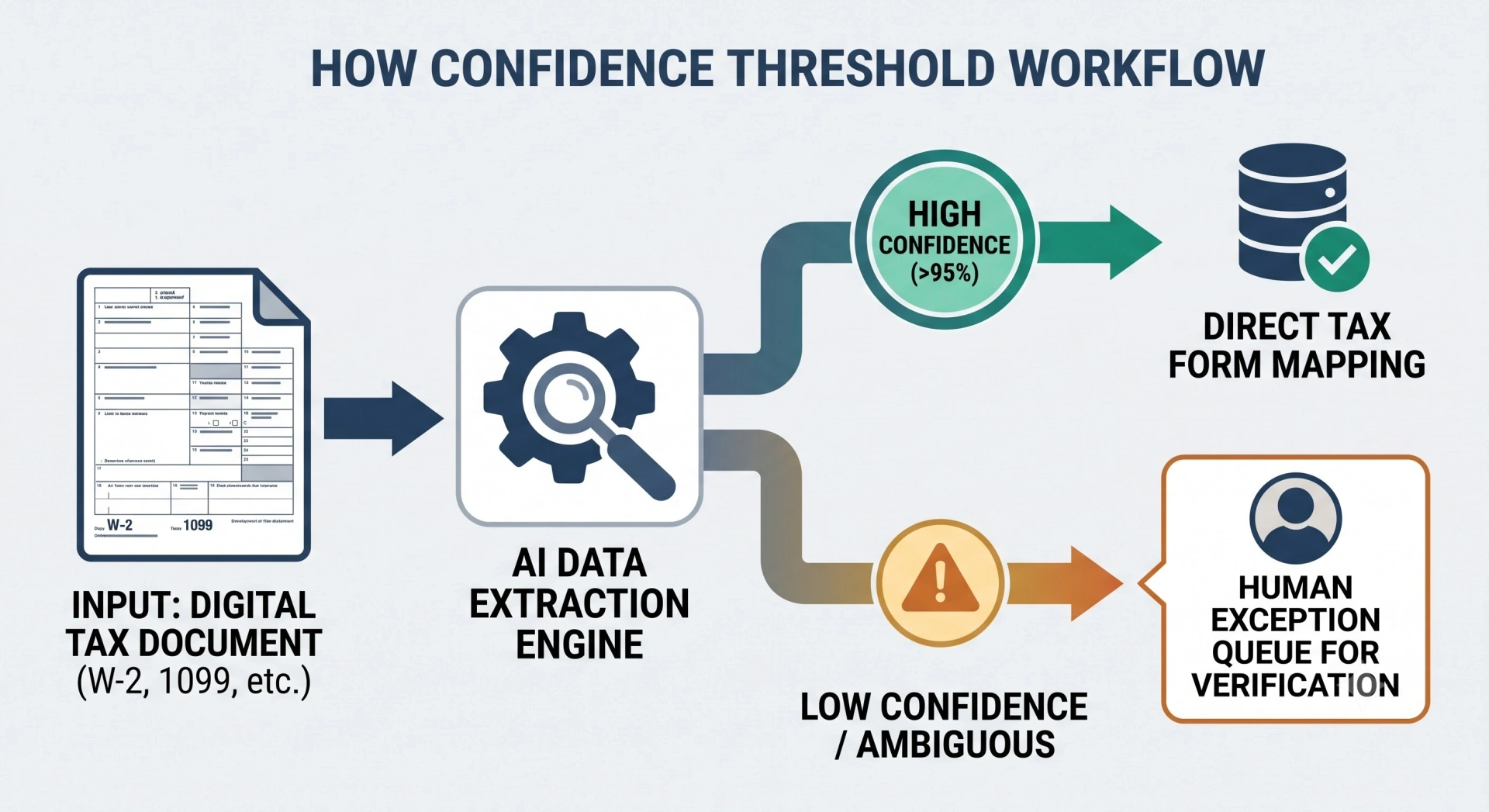
Once a document has been identified, AI-enabled document systems can extract structured fields such as wages, withholding, interest, dividends, proceeds, cost basis, retirement distributions, payer information, mortgage interest, or pass-through amounts.
The key control is confidence.
A clean digital W-2 should not be treated the same way as an unreadable scan, handwritten note, unusual statement, or document with conflicting values. Low-confidence fields should enter an exception queue for human verification rather than flow silently into the return.
That creates a better operating rule:
High-confidence structured data can move forward. Low-confidence or ambiguous data must stop for review.
3. Mapping Source Documents to Form 1040 and Its Schedules
Extraction alone does not prepare a tax return. The extracted value must be mapped to the appropriate tax treatment and destination.
The IRS maintains a central guide to Form 1040 schedules, including Schedules A, B, C, D, E, and others.
Whether activity constitutes a trade or business; expense support
Schedule K-1
Schedule E and related forms/schedules
Basis, passive activity, QBI, state information, footnotes
Form 1098
Schedule A where applicable
Itemization, limitations, ownership and substantiation
Rental records
Schedule E
Basis, depreciation, passive activity, personal use
Equity-compensation documents
Form 1040, Schedule D, Form 6251 or other applicable forms
Basis, disposition treatment, AMT exposure
The final tax treatment still depends on taxpayer facts and current law. Automation should therefore help map and reconcile data without pretending that every source document has one universally correct destination.
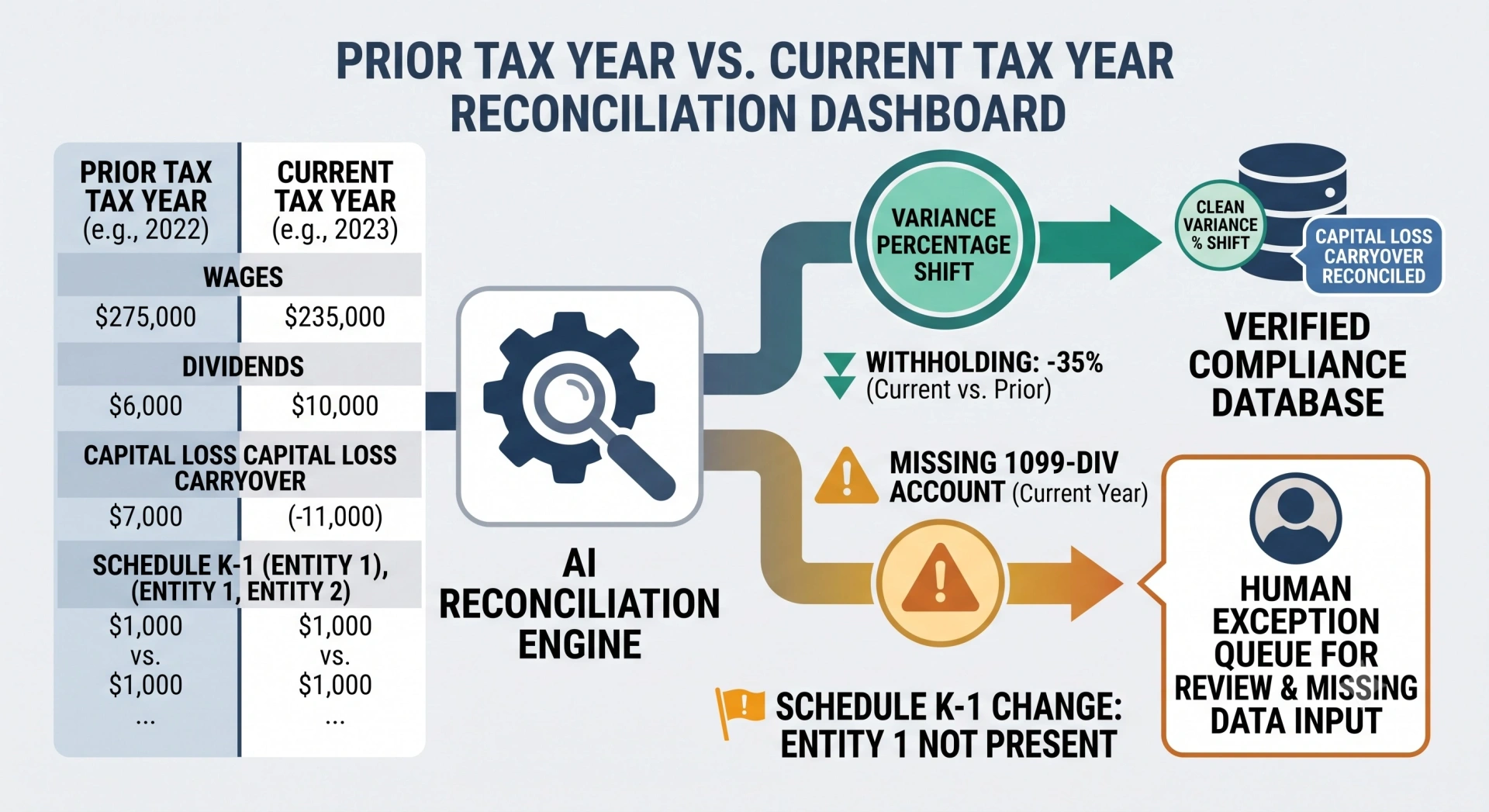
AI can compare current-year information against the prior return and surface changes such as a missing W-2 employer, a brokerage account that disappeared, a new K-1, a change in dependent information, large income variances, changes in withholding, or schedules that were present last year but are absent this year.
The same process helps identify carryovers that should not be lost between years, including capital losses, AMT-related items, passive activity information, and other tax attributes.
The point is not to assume last year must repeat. It is to make unexpected change visible.
5. Diagnostics and Source-Linked Workpapers
The next layer is diagnostics.
A review-ready workflow should be able to surface missing forms, inconsistent values, incomplete basis information, unusual year-over-year movements, calculation anomalies, or return positions that need research.
Each material item should be traceable:
Return value → workpaper → source document → research or authority → reviewer conclusion
That relationship matters more than generating a large volume of AI text. The reviewer needs evidence, not just an answer.
For questions that require federal or state authority, firms can use an AI-assisted tax research workflow and maintain the supporting authority in the workpaper rather than leaving research scattered across chats or email.
Manual vs. AI-Assisted 1040 Tax Preparation
AI changes where staff spend their time. It does not eliminate controls.
Workflow stage
Traditional workflow
AI-assisted workflow
Human control
Intake
Generic organizer and manual follow-up
Personalized requests and automated status tracking
Confirm scope and readiness
Document handling
Open, rename, sort, and identify documents manually
Classify and organize source documents
Resolve unknown or ambiguous documents
Data extraction
Manual keying
Structured field extraction
Verify low-confidence values
Validation
Reviewer finds errors later
Compare source data, prior year, and expected forms earlier
Investigate exceptions
Tax-form mapping
Preparers manually decide and enter each item
Automation assists mapping into return workflow
Confirm tax treatment
Workpapers
Manually assembled
Standardized source-linked workpapers
Document conclusions
Review
Broad rechecking of the file
Exceptions and risk areas surfaced first
Professional judgment and sign-off
Filing
Professional-controlled
Workflow reminders and status automation
Authorization and final filing remain controlled
This is the central economic benefit of the model: the firm shifts staff time away from repetitive handling and toward exceptions, technical issues, client advice, and review.
If document collection is the bottleneck, a personalized client tax organizer can use prior-year return information to make client requests more specific instead of sending the same generic checklist to every taxpayer.
How Should a CPA Firm Prepare for AI-Powered 1040 Production?
Automation works best when the operating rules are established before return volume peaks.
1. Define a Source of Truth for Client and Tax Data
The firm should know which system owns each category of information.
The CRM may own client master data. The document management system may own workpapers. The secure portal may own client uploads. Tax software remains the system of record for return calculations and filing data.
The workflow should define how information moves among those systems and what happens if a field conflicts.
This prevents a common automation problem: making a bad process faster.
2. Route Returns by Complexity Before Preparation Begins
Not every 1040 belongs in the same production lane.
A practical internal scoring model can assign complexity points for factors such as additional states, K-1s, equity compensation, digital assets, rental activity, foreign items, AMT exposure, NIIT exposure, large transaction volume, or unusual basis issues.
For example, a firm might define 0–2 points as a simple lane, 3–5 as moderate, and 6+ as complex. Those numbers are operating examples, not professional standards.
A simple return can go to a junior preparer with senior spot-checking and a short internal SLA. A moderate return may require an experienced preparer and senior exception review. Complex returns may need senior preparation, staged technical sign-offs, and a custom delivery target.
Some issues should bypass scoring completely. A single complicated foreign reporting issue, major basis question, or unusual transaction can justify immediate senior routing even if the return has few other schedules.
For deeper individual-return review around AMT, NIIT, SALT, QBI, phaseouts, and high-income interactions, use CPA Pilot's high-income 1040 review checklist.
Multi-state issues can similarly move into a specialist workflow rather than expanding this return-production process into a full SALT analysis. CPA Pilot's state and multistate tax planning guide covers nexus, multistate risk, and related planning considerations in more depth.
3. Set Scope, Pricing, and Change-Order Rules
Complexity often appears after the engagement begins.
A client who originally appears to have a straightforward return may later provide additional K-1s, a new state filing obligation, crypto transactions, rental property records, foreign information, or equity-compensation activity.
Engagement terms should define what is included, what creates additional scope, who can authorize expanded work, how the fee changes, and whether the return must be moved to another preparer or review lane.
The same principle applies to late documents and rush work.
The goal is not to turn tax preparation into a fee schedule for every document. It is to prevent unexpected technical work from silently consuming reviewer capacity and realization.
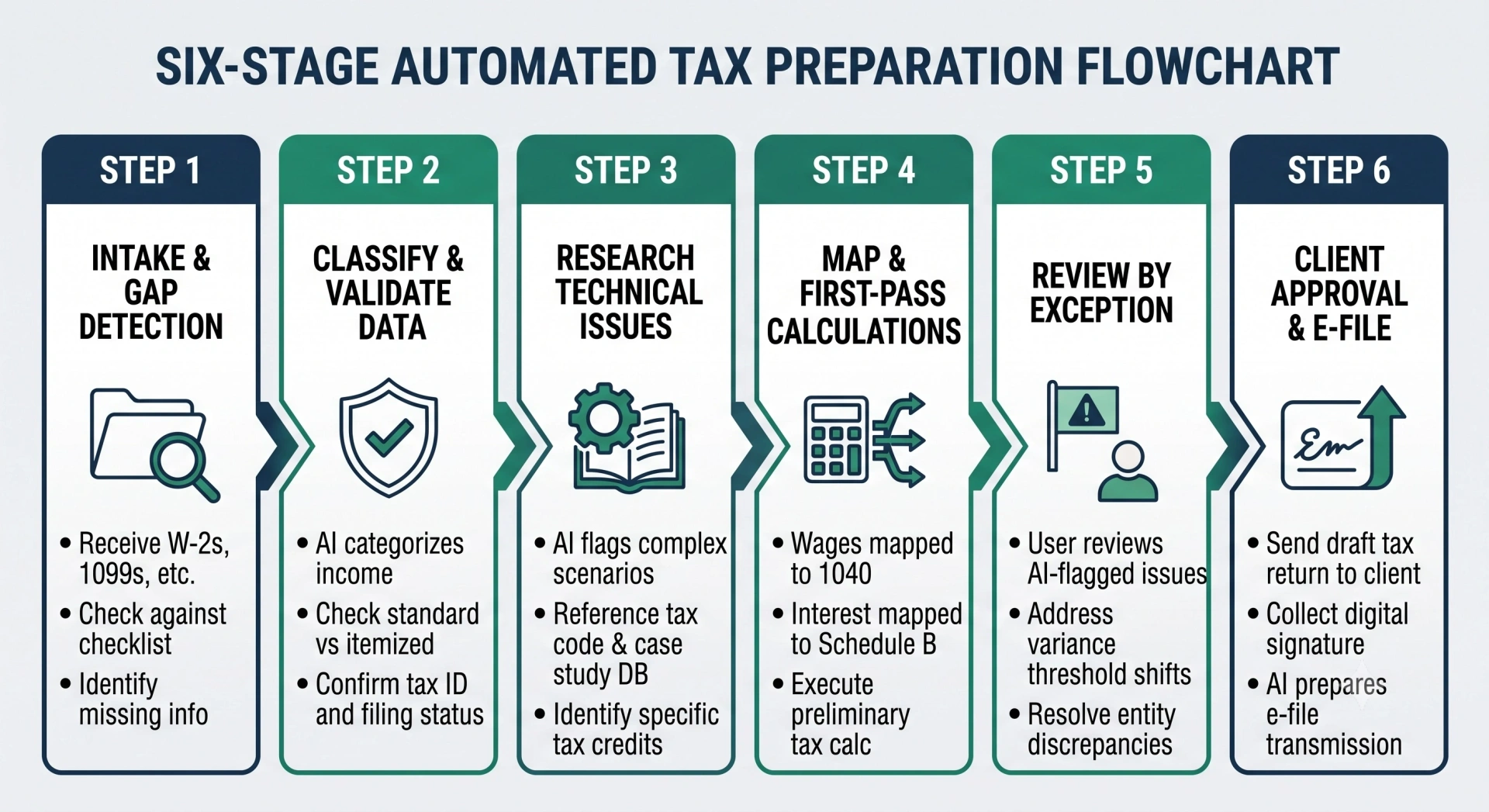
The 6-Step AI-Powered Form 1040 Preparation Workflow
With the operating rules established, the return can move through six defined production stages.
Step 1: Client Intake, Document Collection, and Gap Detection
Preparation should not begin simply because the client uploaded something.
Use a secure portal and a client-specific organizer to identify the expected documents and major fact changes. Compare the current file with the prior-year return and ask directly about new employers, investment accounts, businesses, property, dependents, states, digital assets, retirement activity, and other material changes.
A firm may choose an internal readiness threshold such as 90% of expected documents received, but this should be treated as a workflow policy rather than an IRS rule. More importantly, identify critical missing documents that prevent meaningful preparation.
A return with most minor documents present but no brokerage statement should not be treated as ready just because it meets a numerical threshold.
Use automated reminders for incomplete files. For example, a firm might trigger a follow-up after an unopened request, after a partial upload, or at internal milestones such as 14, 7, and 3 days before a firm deadline.
The metric at this stage is not how quickly a preparer opens the return. It is how quickly the file becomes genuinely ready to prepare.
Once the document set is usable, classify each source document and convert relevant fields into structured tax data.
The automation layer should flag uncertain values rather than guessing.
Validation should include source-document checks, duplicate detection, expected-form checks, taxpayer and payer consistency, prior-year comparison, and obvious cross-document discrepancies.
Poor scans, handwritten material, unusual statements, conflicting values, or low-confidence fields should be routed for human verification.
This is also the correct point to reconcile prior-year carryovers and identify forms that may still be missing.
Step 3: Research and Spot Technical Issues
Not every return requires research. Research should be triggered by facts.
Typical triggers include multi-state or part-year residency, K-1 basis, QBI, equity compensation, AMT, NIIT, passive activity issues, digital-asset transactions, foreign tax items, unusual deductions, unfamiliar credits, or changes in taxpayer circumstances.
The preparer should frame the issue, identify the relevant facts, determine what facts are still missing, obtain authoritative support, and document the conclusion.
AI can accelerate this process by organizing the question and finding relevant authorities, but the conclusion should remain reviewable.
CPA firms that want a deeper research process can use CPA Pilot's guide to how AI is changing tax research alongside its research workflow.
Step 4: Map, Import, and Run First-Pass Calculations
Validated data can now move into the tax preparation environment.
Standardize import and mapping rules wherever possible and reconcile anomalies before the return reaches senior review. If an item requires manual entry or adjustment, mark it clearly rather than hiding it inside the return.
Potentially high-risk calculations—such as basis, self-employment tax, AMT, NIIT, passive limitations, or unusual capital transactions—should be surfaced before the reviewer opens the file.
CPA Pilot's Tax Software Import Assistant supports mapping financial data such as trial balances, P&Ls, fixed assets, and Schedule D data into import-ready formats while flagging ambiguous mappings for review.
The objective of this stage is a return that is review-ready, not merely “data entered.”
Step 5: Review by Exception
Review by exception means using structured diagnostics and workpapers to direct reviewer attention toward risk, uncertainty, inconsistency, and material judgment.
It does not mean ignoring the rest of the return.
A reviewer should be able to see which fields were low confidence, which values changed materially from the prior year, where manual adjustments were made, what tax issues required research, what documentation supports those conclusions, and whether any scope changes appeared during preparation.
CPA Pilot's AI Tax Return Review Engine is designed to flag potential issues, inconsistencies, missed deductions, and filing risks before final sign-off.
A useful review trail records who reviewed the issue, what was found, what changed, when it changed, and why.
Step 6: Client Review, Authorization, Payment, and Filing
Once quality assurance is complete, translate the technical return into a clear client-facing explanation.
The client generally needs to understand the filing result, major year-over-year changes, balance due or refund, important deductions or credits, estimated-payment implications, and any action required before filing.
CPA Pilot's AI Tax Return Summary workflow converts completed returns into plain-language client summaries, which can reduce the need to rebuild the explanation manually for every delivery meeting.
For applicable electronically filed individual returns, the IRS describes Form 8879 as the declaration and signature authorization used with an Electronic Return Originator under the specified e-file methods. Firms should also maintain current e-file procedures using IRS guidance for authorized providers.
Billing controls can be connected to the release workflow according to firm policy, but payment status, client authorization, filing deadlines, and professional obligations should be tracked independently so a billing issue does not create an unmanaged compliance problem.
After transmission, track acceptance or rejection rather than treating “sent” as “done.” Rejected returns should enter a separate exception queue with an owner, resolution status, and client communication step.
Want to see the workflow in practice? CPA Pilot provides demonstrations of its return-review, client-organizer, research, tax-software import, and firm workflow tools. See CPA Pilot in action
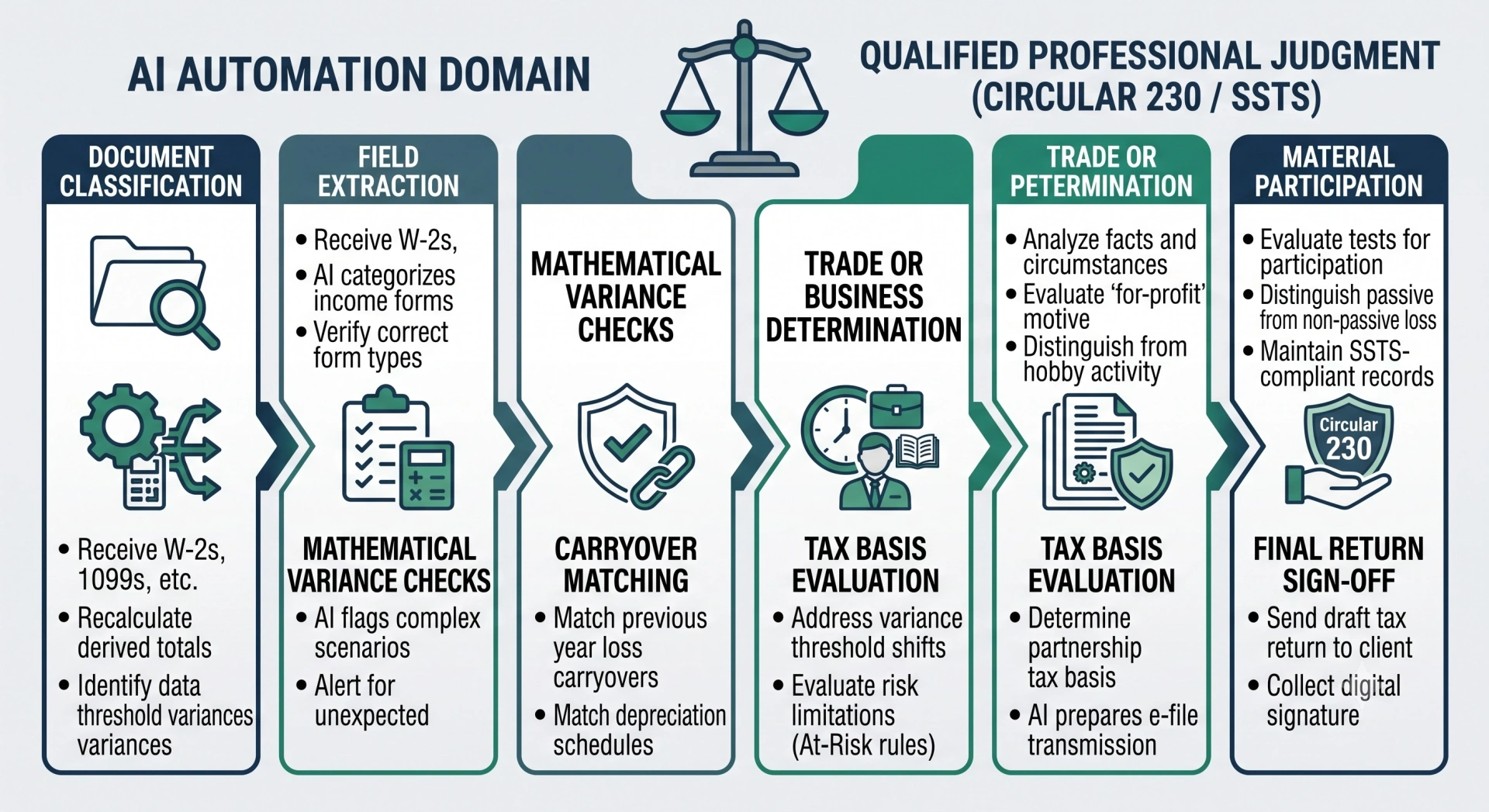
What Should AI Automate vs. What Must a Tax Professional Review?
The safest way to use AI in tax preparation is to separate mechanical work from professional judgment.
AI is well suited to document classification, structured extraction, duplicate detection, prior-year comparisons, missing-item identification, calculation support, variance detection, workpaper organization, draft research, and first-pass issue spotting.
Human review becomes more important as ambiguity increases.
Determining whether an activity is a trade or business, whether an expense is deductible, whether a taxpayer changed domicile, whether a loss is passive, whether basis support is sufficient, whether a K-1 footnote changes the return, whether an election should be made, or whether a position is adequately supported requires more than pattern recognition.
Professional responsibility does not transfer to the software.
The IRS states that Circular 230 establishes standards of competency, diligence, and professional conduct for practitioners who practice before the IRS, including CPAs, enrolled agents, and attorneys. IRS Circular 230 guidance
For AICPA members providing tax services, the Statements on Standards for Tax Services provide enforceable professional standards. The revised SSTS 1–4 became effective January 1, 2024.
The operating principle should therefore be:
AI can produce evidence, comparisons, calculations, research support, and suggested flags. The qualified professional remains responsible for evaluating the facts, resolving uncertainty, and approving the return position.
How Accurate is AI for 1040 Tax Preparation?
There is no single meaningful accuracy percentage for “AI tax preparation.”
Different tasks have different risk profiles.
Extracting a clearly printed wage amount from a digital W-2 is fundamentally different from interpreting a K-1 footnote, determining tax basis, classifying a payment, deciding residency, or evaluating whether a deduction is sufficiently substantiated.
That leads to an important distinction:
Extraction accuracy is not the same as tax judgment accuracy.
A system can copy a number correctly and still place it into the wrong tax context.
A defensible AI workflow therefore needs several controls: confidence thresholds, source-document verification, prior-year comparisons, deterministic tax-software calculations, cross-form diagnostics, escalation rules, and professional review.
What Happens When Confidence Is Low?
Low-confidence information should not silently become tax-return data.
The workflow should preserve the original source, identify the uncertain field, explain why it needs review where possible, and send it to a preparer.
The same treatment applies when the system encounters poor scans, handwriting, unfamiliar documents, overlapping pages, inconsistent taxpayer names, or supporting statements that require interpretation.
NIST's voluntary AI Risk Management Framework is designed to help organizations incorporate trustworthiness into the design, use, and evaluation of AI systems. Its Generative AI Profile further addresses risk management for generative AI. Those frameworks are not tax rules, but they provide a useful governance model for testing, validation, monitoring, and human oversight.
For a tax firm, the practical translation is simple: uncertainty must become visible before it becomes a filing error.
How Do You Secure Taxpayer Data and Maintain a Review Trail?
Tax automation processes some of the most sensitive information a firm holds: Social Security numbers, income data, bank information, tax returns, identity documents, business records, and workpapers.
Security therefore belongs inside the workflow rather than being added after implementation.
1. Control Access to Taxpayer Information
Use multi-factor authentication, role-based access, least-privilege permissions, encryption in transit and at rest, secure document transfer, access logging, and prompt removal of unnecessary accounts.
Preparers, reviewers, administrators, and partners do not automatically need identical permissions.
CPA Pilot documents its own data-protection controls—including local anonymization before transmission, encryption in transit and at rest, access controls, audit logging, and a commitment not to train AI models on client data—on its security page.
2. Account for Tax-Return Information Rules
When client tax information is used or disclosed, tax firms must consider the rules that apply to that information and their specific use case.
The IRS Section 7216 Information Center explains the regulations and consent requirements concerning disclosure or use of tax return information by tax return preparers.
Firms evaluating AI vendors should therefore understand what information leaves the firm, why it is processed, where it is processed, what service providers are involved, what is retained, and what contractual and consent requirements may apply.
3. Maintain a Written Security Program
IRS Publication 4557, Safeguarding Taxpayer Data: A Guide for Your Business, is a primary security resource for tax professionals.
The FTC Safeguards Rule requires covered financial institutions to maintain safeguards for customer information and to take steps concerning service providers that handle that information.
Your written security procedures should address access, device security, data transfer, vendors, incident response, backups, employee access changes, and recovery.
4. Preserve the Review Trail
A review trail should show who prepared and reviewed material items, what issues were flagged, what corrections were made, what authority supported technical conclusions, and who approved the final return.
Retain supporting records according to the rules applicable to the particular record and return. The IRS notes that records supporting income, deductions, or credits generally should be kept until the applicable period of limitations expires; three years applies in many ordinary situations, while longer periods apply in others.
Avoid replacing that analysis with one universal retention period.
How Should a CPA Firm Pilot AI-Powered 1040 Preparation?
Do not redesign the entire tax department during peak filing season.
Start by measuring the existing process.
For a representative group of returns, establish the current time from document receipt to ready-to-prep, preparation time, review time, number of client follow-ups, number of reviewer corrections, second-review rate, total turnaround time, and realized fee.
Then choose a controlled set of straightforward returns.
W-2-based returns, standard deduction cases, and files with limited schedules are easier places to test document handling, research support, review workflows, and client communication than returns with multiple states, complex K-1s, unresolved basis, digital-asset reconciliation, or equity-compensation issues.
Define the human checkpoints before the pilot starts.
Do not wait for an AI error to decide who was supposed to verify the output.
Once the simple lane is stable, expand deliberately into Schedule C, Schedule E, investment-heavy returns, K-1s, multi-state situations, equity compensation, AMT, NIIT, and other higher-complexity profiles.
CPA firms that want to benchmark adjacent processes can also review these time-saving tax workflows for CPAs, which cover intake, document operations, research, review, communication, and closing activities.
How Do You Measure ROI From AI-Powered 1040 Preparation?
The correct ROI question is not “How many AI outputs did the team generate?”
It is:
Did the workflow reduce the cost and friction of producing an accurate, review-ready return?
Start with operational metrics.
Measure turnaround time, time to ready-to-prep, percentage of returns paused for missing documents, client follow-ups per return, first-pass error rate, reviewer minutes per return, percentage needing second review, and time from review-ready to e-file.
Then connect those operating metrics to firm economics.
Track returns completed per staff hour, realization, utilization, write-downs caused by scope creep, collection timing, and Days Sales Outstanding where relevant.
Compare the same return types before and after implementation. Separating simple, moderate, and complex lanes is important because an improvement in W-2 returns can disappear if it is averaged together with high-complexity files.
Avoid publishing a generic “AI saves X%” claim unless the firm has measured it.
The most defensible ROI proof is your own baseline:
manual workflow → controlled AI pilot → measured operational change → expanded deployment
Post-filing data can also feed advisory work. For clients with variable income, capital gains, business income, retirement distributions, or estimated-payment needs, CPA Pilot's AI Tax Projections workflow can use current-year and prior-year information to model alternative scenarios and estimated liabilities.
AI-Powered Form 1040 Preparation FAQs
Can AI Prepare a Form 1040 From Start to Finish?
AI can automate or assist with many parts of Form 1040 preparation, including document organization, data extraction, prior-year comparisons, tax research, workpaper preparation, diagnostics, return review, and client communication. Final tax treatment, judgment-dependent issues, professional review, authorization, and filing controls should remain with qualified tax professionals.
How Accurate Is AI for 1040 Tax Preparation?
Accuracy depends on the task and quality of the input. AI is generally better suited to structured and repeatable work than ambiguous tax judgment. Firms should use confidence thresholds, source verification, prior-year comparison, tax-software diagnostics, and human review rather than relying on a single accuracy percentage.
What Tax Documents Can AI Use in a 1040 Workflow?
Depending on the system, AI-assisted workflows can process common source documents such as W-2s, 1099s, K-1s, mortgage-interest forms, brokerage statements, prior-year returns, business records, rental information, and supporting documents. The firm should verify the capabilities of its specific software and establish manual review procedures for unsupported, unusual, or low-quality documents.
Does AI Replace the CPA or Tax Preparer?
No. AI can reduce repetitive preparation, research, documentation, and first-pass review work, but it does not remove professional responsibility. CPAs, EAs, and other qualified tax professionals still need to evaluate taxpayer facts, resolve ambiguous issues, apply professional judgment, review the return, communicate advice appropriately, and control final filing decisions.
Build a More Review-Ready 1040 Workflow
The best use of AI in Form 1040 preparation is not to remove professionals from the process. It is to remove avoidable friction before the work reaches them.
A scalable workflow collects the right documents, classifies and validates information, identifies missing data, compares the current year with prior returns, surfaces technical issues, maps data into the preparation process, creates traceable workpapers, directs reviewer attention toward exceptions, and keeps final judgment with the professional.
CPA Pilot provides purpose-built workflows for client organizers, tax research, tax software import, return review, projections, and client-ready summaries in one tax-focused workspace.
This article is for general informational purposes and does not constitute individual tax, legal, accounting, security, or professional-practice advice. Federal and state tax rules, professional standards, technology capabilities, and filing procedures change. Verify current authority and the facts of each engagement before acting.
Key Takeaways
4 essential insights
Use AI for classification, extraction, validation, and first-pass review tasks.
Keep CPAs responsible for judgment, exceptions, approvals, and final filing decisions.
Standardize intake through e-file to reduce handoffs, duplicates, and follow-ups.
Integrate client, production, review, and control layers for scalable busy-season workflows.
I’m Harsh Mody, CPA, founder of CPA Pilot—an AI Tax Assistant for CPAs, Enrolled Agents, and U.S. tax firms. With 18+ years in accounting, tax auditing, consulting, and product management, I’ve seen how compliance-heavy work limits true advisory impact. I built CPA Pilot to change that—by applying AI-driven tax research, deduction optimization, and IRS/state code automation to help firms unlock tax savings and scale advisory services with speed and accuracy.