CPA Firm Busy Season Checklist for 2026: Intake, Review, AI & Client Workflows - CPA Pilot
U.S. Tax System
CPA Firm Busy Season Checklist for 2026: Intake, Review, AI & Client Workflows
Harsh Mody
CPA & Founder of CPA Pilot · Jul 6, 2026·5 min read
What You'll Learn
4 key concepts covered
1Standardize client intake and document collection to prevent incomplete return starts.
2Set up staff workflows, review controls, and handoffs before volume peaks.
3Translate IRS filing season updates into internal procedures and client templates.
4Use AI for research and drafting, with CPA judgment and review.
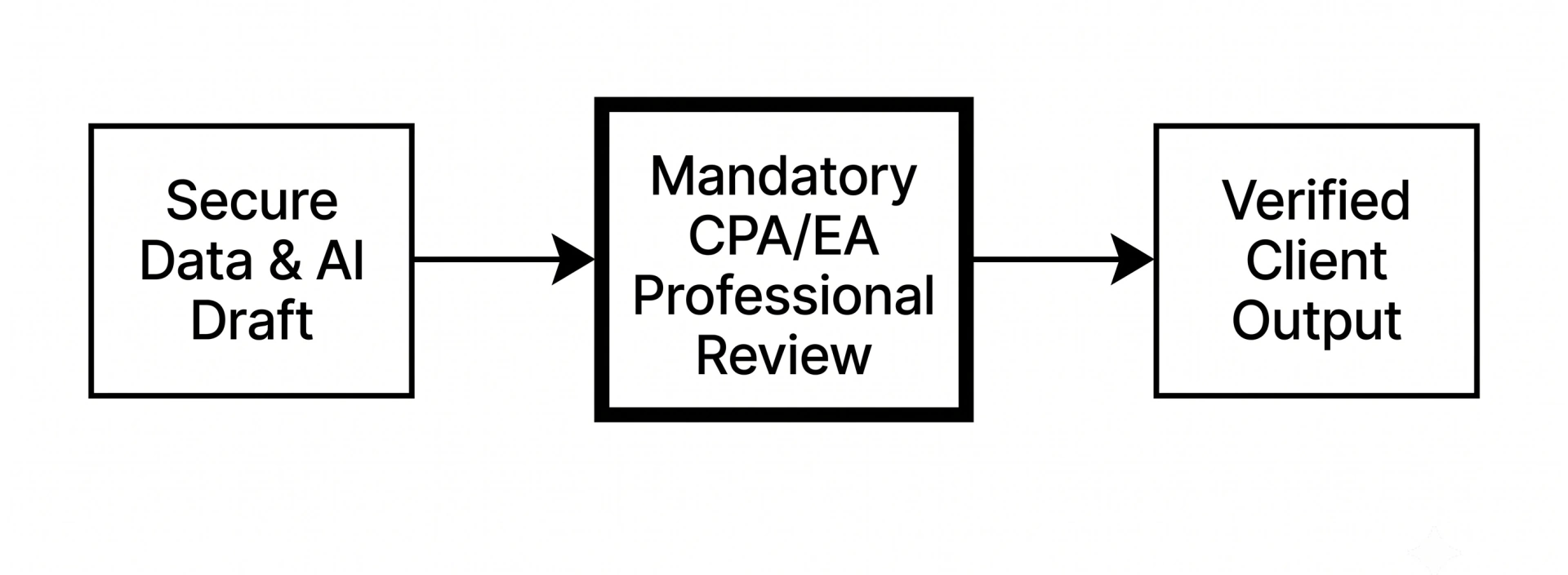
CPA firms can prepare for the 2026 busy season by standardizing client intake, organizing tax documents early, preparing staff workflows, updating client communication templates, monitoring IRS filing-season changes, and using AI carefully for tax research, client explanations, workflow support, and return-review assistance. AI should support CPA judgment, not replace professional review.
This 2026 busy season readiness checklist is written for CPA firm owners, partners, tax managers, EAs, and U.S. tax professionals who want a repeatable workflow before client volume peaks. It also shows where AI can help firms reduce repetitive drafting, improve staff handoffs, and standardize review notes while keeping final tax advice and return approval with the professional.
CPA Pilot is an AI tax workflow assistant for CPAs, EAs, and tax firms. During busy seasons, CPA Pilot can help firms turn recurring tax questions, client emails, review notes, and research workflows into repeatable processes with human review built in.
Why CPA Firms Need a 2026 Busy Tax Season Readiness Plan
Busy season readiness matters because CPA firms are not only preparing tax returns. They are managing deadlines, client data requests, source-document review, staffing, tax law updates, research questions, client explanations, rejected returns, extension decisions, and post-filing issues at the same time.
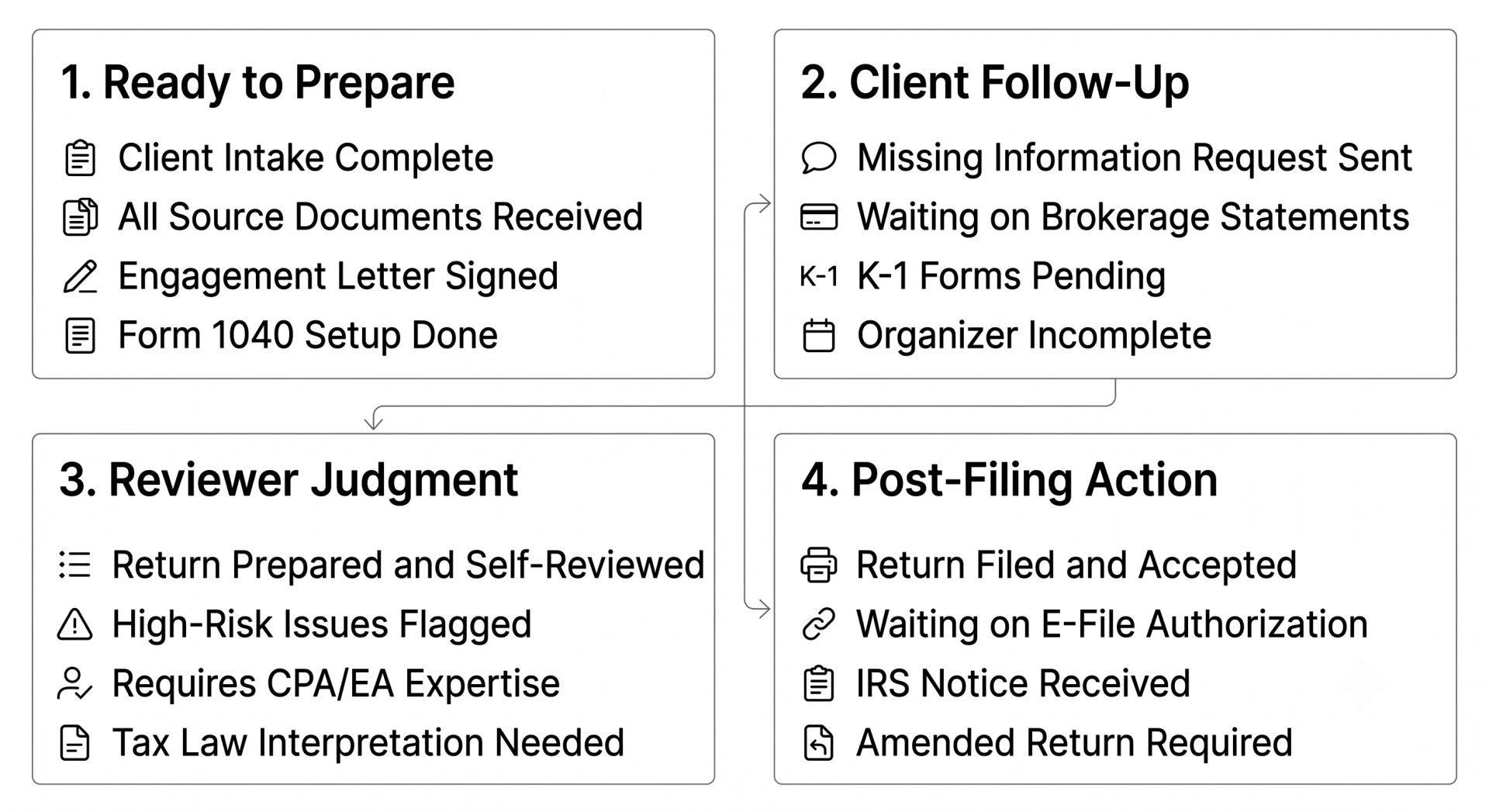
A strong busy season plan helps a firm answer four operational questions:
Question
Why it matters
What work is ready to prepare?
Prevents preparers from opening incomplete files.
What work needs client follow-up?
Keeps missing-information requests visible and assigned.
What work needs a reviewer’s judgment?
Protects quality control and reduces scattered tax research.
What work is waiting on e-file, payment, notice, or amendment action?
Separates post-filing work from active preparation queues.
For a CPA firm, the goal is not to create a longer tax-season checklist. The goal is to create a workflow that keeps the right work moving to the right person at the right time. Firms that want to reduce manual handoffs can also review these time-saving tax workflows for CPAs.
What CPA Firms Should Know About the 2026 Tax Filing Season
CPA firms should verify current-year filing details against official IRS sources before publishing client communications or firm-wide tax season guidance. The IRS opened the 2026 filing season on January 26, 2026, and its newsroom announcement should be treated as the source of truth for filing-season timing and related updates.
The key operational shift is that firms need current IRS guidance translated into internal procedures and staff workflows. When forms, instructions, or IRS publications change, the impact shows up in client organizers, missing-information requests, staff training, review notes, extension messages, and client-facing explanations.
Before client volume increases, assign one person or a small team to monitor:
IRS filing-season announcements.
IRS forms, instructions, and publications.
Draft and final form changes.
IRS e-file guidance for tax professionals.
IRS extension guidance.
IRS estimated tax guidance.
IRS notice guidance.
IRS amended-return guidance.
2026 CPA Firm Busy Season Workflow Milestones
The IRS filing season opening is an external marker, not the beginning of readiness. By the time IRS begins accepting returns, CPA firms should already have completed intake setup, client communication prep, staff assignments, and review controls.
A practical busy season calendar should include internal milestones for:
Firm milestone
Owner
Purpose
Engagement letter sent
Admin or client service team
Confirm the scope before preparation begins.
Organizer sent
Admin or preparer
Start intake before documents arrive.
Source documents uploaded
Client
Establish readiness for preparation.
Missing information request sent
Preparer or admin
Keep incomplete files moving.
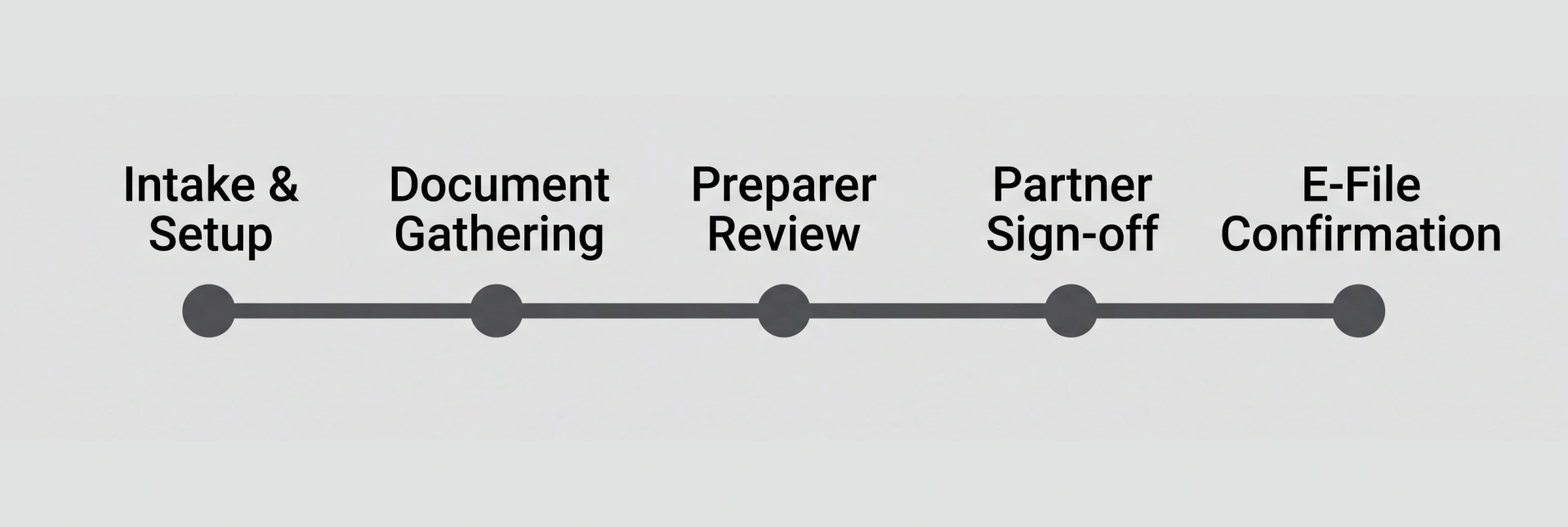
First preparer review completed
Preparer
Catch source-document and data-entry issues early.
Senior review completed
Senior or manager
Resolve diagnostics and open questions.
Partner review completed
Partner
Approve judgment-based issues and final filing position.
Form 8879 collected
Admin or preparer
Confirm e-file authorization before transmission.
Extension decision finalized
Manager or partner
Communicate filing and payment obligations clearly.
For extensions, every client message should clearly explain that an extension gives more time to file, not more time to pay. The IRS explains this in its guidance on getting an extension to file your tax return.
Estimated tax reminders should also be part of the tax-season checklist. Clients with self-employment income, investment income, business ownership, or uneven earnings may need quarterly payment reminders tied to IRS estimated tax rules.
CPA Firm Client Intake Checklist for Busy Season
Before client volume increases, CPA firms should have a consistent process across every return type.
Client intake checklist:
Send the correct organizer before source documents arrive.
Confirm engagement letter status before preparation begins.
Give every client clear portal upload instructions.
Tag each client as new, returning, individual, business, trust, estate, or entity.
Confirm whether the firm needs Form 2848 or Form 8821.
Assign one intake status for every client file.
Recommended intake statuses:
Not started.
Organizer sent.
Documents received.
Missing information.
Ready for preparation.
In preparation.
In review.
Extended.
Filed.
Post-filing support.
This structure helps staff see whether the next step belongs to the client, admin team, preparer, reviewer, or partner. Firms that want a cleaner intake workflow can use a client tax organizer to standardize document requests and reduce scattered follow-ups.
Tax Document Organization and Missing Information Workflow
Source documents should be reviewed before the return enters preparation. This prevents preparers from spending time inside half-complete files.
Document workflow checklist:
Use consistent file naming rules.
Separate income forms, deduction records, business records, prior-year returns, and tax payment records.
Mark each file as complete, incomplete, or review-needed.
Create missing-information tags for unclear income, unsupported deductions, missing basis details, missing K-1s, and unanswered organizer questions.
Send a clear client data request when supporting records are missing.
Keep the missing-information request tied to the return status.
The strongest client data requests are specific and actionable. Instead of “please upload missing documents,” tell the client exactly what is missing, why it matters, and what to upload next.
For current forms, instructions, and publication updates, staff should use the IRS page for forms, instructions, and publications rather than relying on saved prior-year PDFs.
Staff Training Checklist for Recurring Tax Questions
Staff should know how to handle common questions before deadline pressure builds.
Create a busy-season question bank that includes:
Filing status questions.
Dependent questions.
Estimated tax payment questions.
Rental activity questions.
Retirement contribution questions.
Business expense questions.
State tax questions.
K-1 timing questions.
Extension questions.
Refund and filing-status questions.
IRS notice questions.
Each entry should include an approved internal answer, source links, reviewer notes, and escalation rules. The goal is not to make staff guess faster. The goal is to help them identify the issue, collect the facts, and route the question correctly.
CPA Firm Tax Research Workflow
Tax research should move through a defined review path before it affects a return position.
Tax research escalation checklist:
Write the client issue in one sentence.
List known facts and missing facts.
Identify the return, form, deduction, credit, income item, or position affected.
Check IRS forms, instructions, and publications when the issue depends on return instructions.
Use the Internal Revenue Bulletin or other firm-approved sources when official guidance is needed.
Summarize sources reviewed, preliminary conclusion, and remaining uncertainty.
Route unclear or high-risk issues to a senior reviewer, manager, or partner.
Save the reviewer’s decision in the workpaper, client file, or review notes.
AI can help summarize the issue, organize facts, and prepare a first-pass research memo. AI should not be the final authority for a tax position. CPA firms can use an AI tax rese arch assistant to structure research questions, organize facts, and prepare cleaner review notes before a senior or partner evaluates the issue.
Tax Season Client Communication Templates
Client communication should be prepared before the firm is under deadline pressure. Templates should be short, client-friendly, and reviewed by the firm before use.
Prepare templates for:
Missing-document requests.
Unclear organizer responses.
Extension explanations.
Estimated tax reminders.
Refund-delay updates.
Filing-status updates.
IRS notice responses.
E-file authorization messages.
Rejected-return updates.
Post-filing payment reminders.
Amendment follow-ups.
Next-year planning prompts.
Each template should include the action needed, due date if applicable, client impact, and firm contact path. CPA firms can use an AI email assistant for CPAs to turn reviewer notes, missing-document comments, and filing updates into clearer client-ready drafts.
CPA Firm Tax Return Review Checklist
Return review should happen in stages so preventable errors are caught before final approval.
Return review checklist:
Require the preparer to self-review before the return moves forward.
Match source documents to the return before senior review.
Review diagnostics before partner approval.
Flag high-risk returns for deeper review.
Compare major year-over-year changes.
Reconcile estimated tax payments and carryforwards.
Confirm e-file authorization before transmission.
Save reviewer comments, sign-off notes, and final filing confirmation.
A quality-control checklist helps partners spend more time on judgment-based review and less time on preventable cleanup. For review-heavy firms, the AI tax return review tool can support first-pass issue organization before senior or partner review.
Post-Filing Workflow for IRS Notices, Rejections, and Amendments
Post-filing work should have its own workflow because it does not follow the same path as return preparation.
Post-filing workflow checklist:
Create a separate queue for IRS notices.
Create a separate queue for rejected returns.
Assign e-file rejection triage by issue type.
Document the IRS notice date and response deadline.
Document the client issue and the correction needed.
Review amended-return guidance before preparing corrections.
Save reviewer decisions and final actions taken.
For internal support, CPA firms can connect post-filing workflows to IRS e-file guidance, IRS notice guidance, and amended-return guidance. Firms that want a more repeatable triage process can also use CPA Pilot’s guidance on how to fix IRS rejection codes and build AI-supported workflows for IRS notice response compliance.
How CPA Firms Can Use AI During Busy Season
CPA firms can use AI during busy seasons to reduce repetitive drafting, organize research questions, summarize review concerns, and help staff respond faster to recurring tax issues. The strongest use case is not “AI prepares the return.” The strongest use case is “AI helps the firm move information from intake to review with better structure, clearer notes, and less manual rewriting.”
For firms comparing different AI options, this AI tax planning tools comparison explains how tax-focused AI tools differ from generic AI systems.
1. Use AI for Tax Research and Issue Spotting
CPA Pilot helps tax professionals structure tax research before a reviewer spends time on the issue. A preparer can use CPA Pilot to frame the question, organize client facts, identify missing facts, and prepare a cleaner summary for review.
This is useful for recurring Form 1040 questions, business-tax issues, deduction questions, credit explanations, and source-backed research that needs to be checked against IRS forms, instructions, publications, or the Internal Revenue Bulletin. CPA Pilot’s AI tax research assistant can support this kind of first-pass issue framing before professional review.
2. Use AI for Client Email Drafts and Tax Explanations
CPA Pilot helps firms draft clearer client explanations without starting from a blank screen. A reviewer note can become a plain-English client email. A missing-information comment can become a short request. A filing outcome can become a client-ready summary.
This matters during busy seasons because clients often need the same types of explanations: missing documents, organizer clarification, extension reasons, estimated tax reminders, refund questions, e-file authorization, and post-filing next steps.
For firms that want a more structured drafting workflow, CPA Pilot’s AI email assistant can support client communication drafts for missing documents, extension explanations, estimated tax reminders, and post-filing updates.
3. Use AI for Organizer Follow-Ups
AI can make organizer follow-ups more specific. Instead of sending a broad message, the firm can generate a focused request that names the missing item, explains why it matters, and tells the client exactly what to upload next.
Example:
Internal note: Client uploaded brokerage statements, but no basis details for the transferred account.
Client request: Please upload the basis records for the transferred brokerage account. We need those records to confirm the gain or loss reported on the return.
The firm should review the final wording before it reaches the client. CPAs can also make use of our AI Tax Organizer to do follow ups.
4. Use AI for Tax Return Review Support
AI can support return review by summarizing open issues, organizing preparer notes, listing unresolved questions, and highlighting items that need reviewer attention. It can also help create review checklists for complex returns, multi-entity clients, rental activity, business deductions, or unusual year-over-year changes.
AI should not approve a return, clear a diagnostic, or decide a tax position by itself. Tax positions must be reviewed against official sources, client facts, and firm procedures.
5. Use AI for Junior Staff Training
AI can help junior staff understand recurring tax concepts faster. A firm can use it to explain why a reviewer asked for more facts, what a document supports, how to summarize a client issue, or how to prepare a cleaner review note.
This works best when the firm builds role-based examples:
Role
AI-supported training use
Junior preparer
Plain-English explanation of a recurring tax concept.
Senior preparer
Checklist for facts and documents needed before review.
Manager
Summary of issue, risk, and reviewer decision needed.
Partner
Concise conclusion with open questions and source references.
6. Use AI for Documenting Tax Positions
AI can help turn scattered comments into structured documentation. It can summarize the tax issue, client facts, sources reviewed, preparer's conclusion, reviewer decision, and final treatment in the return file.
This matters for quality control, staff accountability, client service, and post-filing review. If a client later receives an IRS notice or a return question comes back to the firm, the reviewer should not have to reconstruct the reasoning from scattered messages.
AI Workflow Controls Every CPA Firm Should Have
AI can improve busy-season workflows only when the firm sets rules for human review, source checking, data privacy, and documentation.
Require Human Approval Before Client-Facing AI Output
AI-generated client messages should be reviewed by a CPA, EA, partner, manager, or qualified reviewer before sending. This includes explanations about tax positions, missing documents, extensions, estimated tax, IRS notices, refunds, amendments, and e-file rejections.
Require Source-Backed Tax Research Documentation
AI-assisted tax research should be tied to source review. Staff should document:
The question asked.
Known client facts.
Missing facts.
Sources reviewed.
Preliminary conclusion.
Reviewer decision.
Final treatment in the return.
This protects the firm from treating a fluent AI answer as a verified tax conclusion.
Set AI Data Privacy and Access Controls
CPA firms handle sensitive client data. AI usage should follow firm-approved data privacy and security rules.
What should never be pasted into an unapproved tool?
Use Standard AI Prompts and Firm Workflows
Approved prompts help firms get consistent output and reduce risky ad hoc usage. Prompt libraries can support missing-document requests, tax research summaries, client explanations, review notes, and staff training.
The prompt should make the control clear. For example: “Draft a client-friendly explanation, but do not give final tax advice. Include a list of items the reviewer must verify before sending.”
Reviewer Notes and Audit Trails
AI-supported work should be saved inside the client file, workpaper, review note, or firm-approved workflow system with reviewer signoff. The firm should be able to see what issue was reviewed, which sources were checked, who approved the decision, and what final action was taken.
How CPA Pilot Supports Busy Season Workflows
CPA Pilot supports busy-season workflows by helping tax professionals turn repeated questions, review comments, research needs, and client explanations into a more consistent process. It is not a replacement for CPA judgment. It is a workflow layer that helps firms move faster from question to draft, from draft to review, and from review to client-ready communication.
For firms that need shared workflows across preparers, reviewers, and partners, CPA Pilot team plans can support firm-wide AI usage during busy season.
Tax Research Support: CPA Pilot helps tax professionals structure tax research before a reviewer spends time on the issue. A preparer can use CPA Pilot to frame the question, organize client facts, identify missing facts, and prepare a cleaner summary for review.
Client-Ready Drafts: CPA Pilot helps firms draft clearer client explanations without starting from a blank screen. A reviewer note can become a plain-English client email. A missing-information comment can become a short request. A filing outcome can become a client-ready summary.
Workflow Consistency: CPA Pilot helps firms manage repeat questions that appear across clients and staff. Instead of answering the same 1040, entity, deduction, extension, or notice question differently each time, firms can use CPA Pilot to create consistent internal answers, staff notes, and client-facing explanations.
Review Support: CPA Pilot can help partners and reviewers prepare better review notes by summarizing open items, organizing unresolved questions, and turning scattered comments into a cleaner review trail. The final decision still belongs to the CPA, EA, partner, or qualified reviewer.
CPA Pilot is an AI tax workflow assistant for CPAs, EAs, and tax firms. During busy season, CPA Pilot can help firms research tax questions, draft client-ready explanations, support staff training, prepare client emails, and standardize recurring tax workflows while keeping final review with the tax professional. For review-heavy firms, CPA Pilot’s AI tax return review tool can support first-pass issue organization before senior or partner review.
Want to see how CPA Pilot can support your firm’s busy-season workflow? Schedule a CPA Pilot demo and explore how AI can help your team handle tax research, client emails, and recurring tax-season questions with more consistency. If you are comparing options before implementation, review CPA Pilot pricing to choose the right AI tax software plan for your firm.
2026 Busy Season Readiness Checklist Summary
A 2026 busy season readiness checklist should be organized by timing: before the busy season, during the busy season, and after the filing season. This helps CPA firms separate setup work, active return production, and post-filing support.
Before Busy Season
Use this phase to prepare the firm before client volume increases.
Finalize client intake rules and organizer workflows.
Update engagement letters and portal instructions.
Review IRS forms, instructions, and publications for current-year changes.
Prepare staff training materials for recurring tax questions.
Create approved client communication templates.
Set review standards for preparers, seniors, managers, and partners.
Define AI usage rules, human review steps, and data privacy controls.
Build a tax research process for issues that need source-backed review.
During Busy Season
Use this phase to keep returns moving without losing control over missing information, review notes, client approvals, or filing status.
Track each return by workflow stage.
Separate ready-to-prepare files from incomplete files.
Monitor missing client information daily.
Use approved templates for client data requests and filing updates.
Summarize tax research questions before escalation.
Review AI-assisted drafts before sending anything to clients.
Confirm e-file authorization before transmission.
Explain extension decisions using IRS guidance.
Track rejected returns outside the normal preparation queue.
After Filing Season
Use this phase to resolve post-filing issues and improve the firm’s year-round workflow.
Review IRS notices and assign response ownership.
Create a separate queue for rejected returns.
Evaluate whether a filed return needs correction.
Review which client questions are repeated most often.
Identify review bottlenecks and staffing gaps.
Document which AI-supported workflows worked well.
Turn successful templates, prompts, and review notes into year-round firm standards.
FAQs About 2026 CPA Firm Busy Season Preparation
When does the 2026 tax season start?
The IRS opened the 2026 filing season on January 26, 2026. CPA firms should still complete intake setup, staffing plans, review workflows, and client communication templates before the season opens.
What should CPA firms do before the busy season?
Before the busy season, CPA firms should standardize client intake, organize source-document workflows, prepare staff training, update client communication templates, define review checkpoints, build tax research escalation rules, and set AI usage controls for human review, source checking, data privacy, and documentation.
How can CPA firms use AI during tax season?
CPA firms can use AI during tax season for tax research summaries, client email drafts, organizer follow-ups, missing-document requests, review-note drafting, staff training, and recurring workflow support. AI output should be reviewed by a CPA, EA, manager, partner, or qualified tax professional before it affects a return or reaches a client.
Can AI replace tax preparers or CPAs?
No. AI should support tax professionals, not replace them. Tax return preparation still depends on client facts, source documents, IRS guidance, professional judgment, quality control, and reviewer signoff. AI can help with drafts and structure, but the final tax position and client advice should remain with the professional.
What AI controls should CPA firms have?
CPA firms should have AI controls for human review, source-backed research, data privacy, access permissions, approved prompts, firm-approved workflows, reviewer notes, and audit trails. Staff should know which AI tools are approved, what client data can be used, and where AI-supported work must be documented.
Key Takeaways
4 essential insights
Standardize client intake and document requests before returns enter preparation queues.
Assign owners to track IRS updates and convert them into firm procedures.
Build clear staff workflows for prep, review, e-file, notices, extensions.
Use AI for drafting and research support, with mandatory human review.
Was this article helpful?
Sorry about that. How can we improve?
Thanks for the feedback! It helps us improve.
Share
Harsh Mody
CPA & Founder of CPA Pilot
I’m Harsh Mody, CPA, founder of CPA Pilot—an AI Tax Assistant for CPAs, Enrolled Agents, and U.S. tax firms. With 18+ years in accounting, tax auditing, consulting, and product management, I’ve seen how compliance-heavy work limits true advisory impact. I built CPA Pilot to change that—by applying AI-driven tax research, deduction optimization, and IRS/state code automation to help firms unlock tax savings and scale advisory services with speed and accuracy.