
![Washington B&O Tax: Classification, Rates & Filing Guide [2026 Edition]](https://www.cpapilot.com/blog/wp-content/uploads/2026/05/Washington-BO-Tax-.png)


Time Management Tips for CPAs – 13 Workflows to Save Time This Tax Season

[Last Updated on 5 months ago]
What would a busy season look like if your firm could trade late nights for leverage? For CPAs and Enrolled Agents juggling 1040 reviews, client emails, and practice management, effective time management tips for CPAs start with smarter task management—not more hours.
TL;DR: Time management Tips for CPAs
- CPAs can save 60–90 minutes per 1040 by automating tasks like research, client emails, IRS notice responses, junior training, and document handling.
- Busy season peaks from Jan–Apr and again in Oct. Big 4 firms see surges around March and Sept. Prepping workflows and templates in advance reduces pressure.
- CPA Pilot, an AI-powered assistant, streamlines 13 workflows—including 1040 research with citations, client-ready templates, SOPs, scenario modeling, and auto-tagged document intake.
- A 48-hour workflow example shows how to move from intake to review efficiently, cutting context switching and review delays.
- Key metrics include file cycle time, rework rate, and first-pass approvals. Tools integrate with Drake, Lacerte, UltraTax, ProSeries, and QBO—no new systems required.
- CPAs can shift from reactive work to proactive enablement using AI, checklists, and task automation that shorten review cycles without sacrificing compliance.
In this guide, we’ll share practical time management tips and field-tested tips for accountants that
- Make intake smoother,
- Reduce context switching, and
- Keep IRS-cited work products consistent.
You’ll also see how CPA Pilot—an AI tax assistant built for firms drives how CPAs save time during tax season by automating tax research, client communications, and junior training while respecting security and review controls.
Expect plain-English checklists, templates, and easy task management for accounting firms that plug into your existing tax suites (Drake, Lacerte, UltraTax, ProSeries, ProConnect) and workflows—so your team moves from intake to review to filing without bottlenecks.
First, we’ll align on
- Timing (tax vs. audit peaks, including Big 4), then
- Move into the 13 workflows, and
- Finally, quantify hours saved with simple proof artifacts
So your team can implement confidently and measure the impact.
Here we go to discuss how CPAs save time during tax season without any further ado!!!
Table of Contents
Core Time Management Principles for CPAs
Before diving into workflows, it helps to anchor time management tips for CPAs in a few simple principles that apply across firms and file types.
- Batch related work: Group similar tasks (e.g., organizer follow-ups, estimate emails, notice responses) to cut setup time and reduce context switching.
- Triage by deadline and completeness: Prioritize work using a matrix of deadline risk × file completeness so reviewers never idle while waiting on missing documents.
- Standardize templates and SOPs: Use shared templates, checklists, and “what good looks like” examples so juniors move more files to “ready for review” on the first pass
- Automate repetitive steps: Let tools handle auto-tagging, naming, and routing documents so human time is reserved for judgment calls and client conversations.
- Measure and iterate: Track cycle time, throughput, and rework rate to prove which time management tips for CPAs actually move the needle for your firm.
These principles show up repeatedly in the 13 workflows below, making each workflow a concrete, implementation-ready “tip.
When is the Busy Season for Tax & Audit (Incl. Big 4)?
For most tax firms, busy season peaks in January–April, with a smaller October spike for extensions. Big 4 tax teams (Deloitte, PwC, EY, and KPMG) also surge around March and September/October due to entity deadlines, while audits often stack January–March for calendar-year clients.
With the cadence set, here’s why it matters—how to staff, sequence work, and make task management for accountants proactive
- Capacity & triage: Align staff schedules, SLAs, and reviewer gates to the Jan–Apr wave; hold a lighter internal sprint in late August to prep extension communications.
- Workflow readiness: Pre-stage organizer follow-ups, payment-voucher emails, and IRS-cited explainer blocks—this is easy task management for accounting firms because you batch once and reuse often.
- Persona fit: Partners want ROI and integration clarity; solos need quick wins; juniors need stepwise SOPs. The calendar lets you roll each enablement just-in-time, so task management for accountants becomes proactive, not reactive.
See our year-end tax planning with AI guide and last-minute tax planning tips to get more help. Now, let’s turn the calendar into action
13 Time Management Workflows CPAs Can Use Today
These workflows translate high-level time management tips for CPAs into practical, repeatable steps your team can run during busy tax season.
- Automate 1040 Research (with IRS/State Citations): A citation-first template converts questions into reviewer-ready answers—core time management tips for faster sign-off.
- Client-Ready Emails in Minutes: One-click templates for missing docs, vouchers, extensions, estimates, and organizer nudges—practical tips for accountants under pressure.
- Batch Client Updates/Newsletters: Segment by profile; auto-insert due dates and payment guidance to reduce one-off replies.
- Organizer Follow-Ups & Missing-Info Lists: Structured requests prevent files from stalling; track responses by status.
- Draft IRS Notice Responses Faster: Use a shell with slots for facts, amounts, timeline, and code references to avoid blank-page delays.
- One-Click Planning Memos: Roll research into a client-facing memo with embedded citations and next steps.
- Scenario Modeling for Common Questions: Model S-corp comp, state moves, RSU timing—number-first outputs clients understand.
- Onboard/Train Juniors via SOPs & Q&A Copilot: Searchable steps and “what good looks like” examples reduce escalations.
- Tax-Software Troubleshooting Accelerator: Quick links for Drake, Lacerte, UltraTax, ProSeries, ProConnect, and QBO to cut vendor hold time.
- Workpaper Summaries & Meeting Notes: Standardize summaries into decisions + tasks so reviews start focused.
- Pre-Built Explainers for Platform/Payer Reporting (e.g., 1099-K): Ready-to-send explainers reduce back-and-forth and maintain consistency.
- Document Intake, File-Naming & Tagging Automation: Auto-name and tag uploads; route to the right workpaper folder—easy task management for accounting firms in action.
- Engagement Letters, E-Sign & Reminder Cadences: Pre-filled letters, automated e-sign sequences, and SLA reminders keep matters moving.
48-Hour Time Management Workflow for CPAs (Pilot on One Client)
To see these time management tips for CPAs in action, use this 48-hour pilot on a single 1040 client and measure cycle time.
- Hour 0–2 — Communications (W2, W4): Send organizer + missing-info template; preload estimate/extension variants.
- Hour 2–6 — Document Ops (W12): Intake uploads, auto-name and tag, route to the correct workpaper folder.
- Hour 6–12 — Research & Decisions (W1, W6): Run targeted 1040 tax research with citations; convert into a client-facing planning memo.
- Hour 12–24 — Advisory Scenarios + Comms (W7, W3, W11): If relevant, model a scenario (e.g., S-corp comp); schedule an update/newsletter or send a payer/platform explainer (e.g., 1099-K).
- Hour 24–36 — Review Enablement (W10): Produce a standardized workpaper summary and meeting notes so reviewers start with conclusions and next steps.
- Hour 36–48 — Closing & Admin (W13, W2): Issue engagement letter with e-sign and reminders; send final client email with next-step CTA.
This sequencing reduces context switching and exemplifies task management for accountants at a practical, file-level scale.
CPA Pilot centralizes these thirteen workflows precisely help CPAs save time during tax season while preserving reviewer control and audit-ready documentation.
Quantify Time Savings: How CPAs Reclaim 60–90 Minutes Per File?
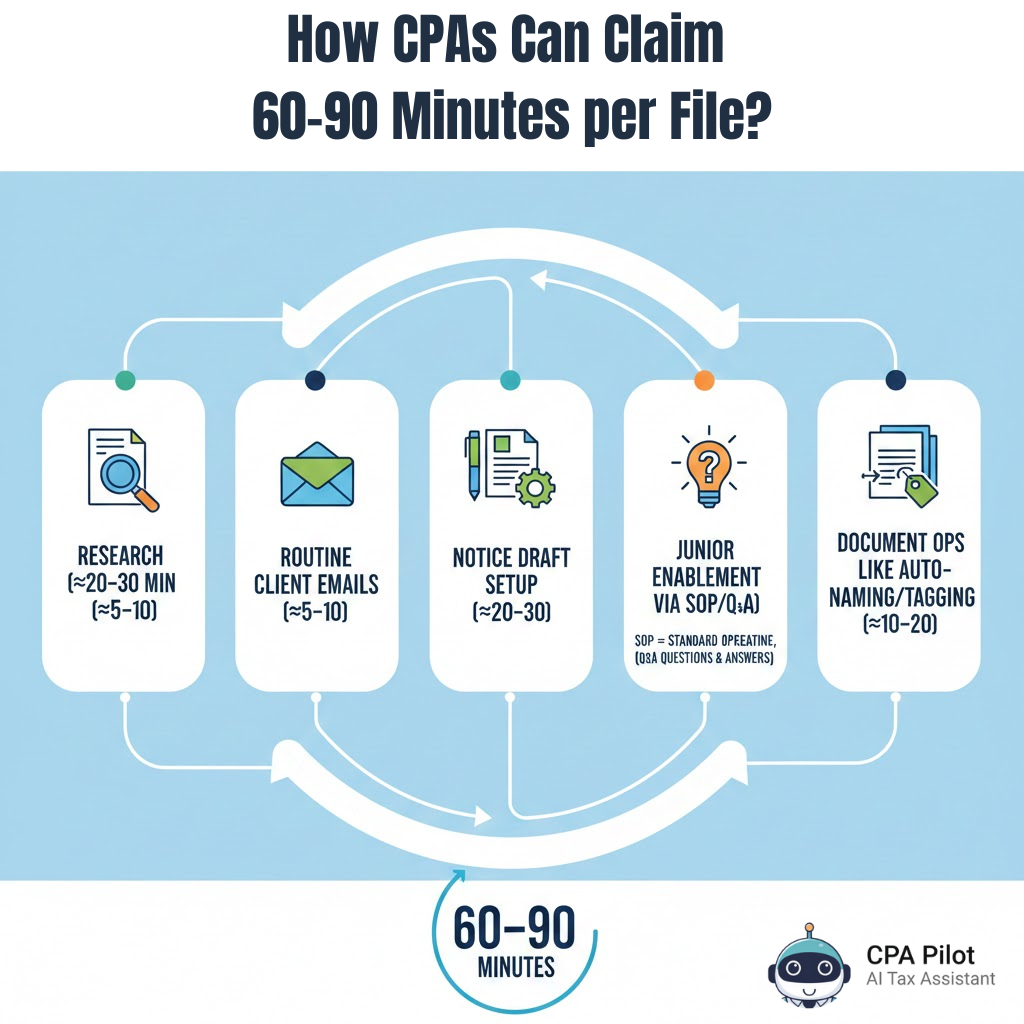
CPA firms can typically reclaim 60–90 minutes per 1040 within two weeks by streamlining five hotspots:
- Research (≈20–30 Min Cut),
- Routine Client Emails (≈5–10),
- Notice Draft Setup (≈20–30),
- Junior Enablement Via SOP/Q&A (≈10–15), And
- Document Ops Like Auto-Naming/Tagging (≈10–20).
To prove it, run a light baseline: for one week, record
(1) Cycle time from “prep” to “ready for review,”
(2) Throughput as “files advanced to review per day,” and
(3) Rework rate plus reviewer touches. Then enable the workflows for two weeks and compare Pre vs. Post medians.
Keep simple artifacts only (the memo with citations, the email template used, a send log, a populated notice shell)—no extra spreadsheets. Your math:
Hours saved/week = Σ (time delta per task in minutes × weekly frequency) ÷ 60.
Scale the top two wins first; this is a practical time management tip in action without extra admin, and it keeps task management for accountants focused on outcomes.
Save Hours This Tax Season by Automating with CPA Pilot
Busy season rewards flow, not heroics: Clear owners, lean templates, and automations that move files to “ready for review” faster. If you want proof—not promises—put the one and only AI-backed tax assistant – CPA Pilot on a single engagement this week and watch cycle time drop.
This is exactly how CPAs save time during tax season: Citation-ready research, one-click client comms, structured notice drafts, and guided SOP/Q&A—without adding management overhead.
Book a 30-minute demo to see your Drake/Lacerte/UltraTax/ProSeries/ProConnect/QBO stack mapped in minutes.
Time Management Tips FAQs
What integrations should CPAs enable before the busy tax season?Connect tax software, email, e-sign, calendar, and cloud drive to cut handoffs.
How should firms prioritize client work during peak weeks?
Use a triage matrix: deadline risk × file completeness.
What’s the best way to organize digital tax documents?
Auto-tag and name documents at intake, assign them to structured folders, and link them to client workflows to avoid bottlenecks and ensure audit-ready digital organization.
How do AI Tax Assistants help train junior tax staff?
AI Tax Assistants help juniors by providing stepwise SOPs, guided Q&A, searchable help, and real-time examples, reducing escalations and increasing first-pass accuracy without senior interruption.


![Last-Minute Mid-Year & Year-End Tax Planning Using AI – [2026 GUIDE]](https://www.cpapilot.com/blog/wp-content/uploads/2025/09/Last-Minute-Mid-Year-Year-End-Tax-Planning-Using-AI.png)