
![Florida Tax Planning – Residency, IRS & Multi-State Risk [2026 Guide]](https://www.cpapilot.com/blog/wp-content/uploads/2026/02/Florida-Tax-Planning.png)

AI Tax Assistant for Financial Advisors – Plan, Document, Comply with CPA Pilot

[Last Updated on 3 weeks ago]
Are your clients asking more “tax” questions than ever, and expecting you to help them make the right money moves?
TL;DR: What CPA Pilot Delivers for Financial Advisors
- Clients expect tax-smart advice—especially around retirement, equity comp, and legacy planning.
- Tax planning ≠ tax prep—advisors must guide strategy without crossing regulatory boundaries.
- Manual research and write-ups slow teams down and increase compliance risk.
- Generic AI isn’t built for advisors—uncited, unstructured answers create new liability.
- CPA Pilot provides cited, regulation-linked answers to real planning questions.
- Supports workflows from document intake to decision-ready outputs, including summaries, memos, and CPA briefs.
- Helps advisors compare tax-impact scenarios, not just define terms.
- Generates consistent, compliant documentation for meetings and recordkeeping.
- Protects client data and embeds disclaimers automatically.
- Easy to roll out: start with one workflow, templatize successful prompts, scale with SOPs.
Built to solve the capacity crunch by removing low-value research and note-taking tasks
It’s obvious, because tax rules are changing, and can quickly affect how much your clients keep, how they retire, and what they leave behind.
CFP Board research shows that nearly 9 in 10 (88%) CFP professionals say upcoming tax changes could put clients’ financial goals at risk, and they point especially to retirement income (57%) and legacy planning (53%) as the most exposed areas. (Sources),
In response, many planners are already recommending practical steps clients understand—like
- Roth conversions (64%),
- Increasing retirement contributions (64%), and
- Tax-loss harvesting (61%)
Which is exactly why advisors need a simple, repeatable way to research options and document the “why” behind recommendations.
CPA Pilot is designed for this tax planning work: It helps advisors ask tax planning questions, compare “what-if” choices, and produce clean client-ready notes, while staying on the planning side.
So, without any further ado. Let’s dig into details!!!
Table of Contents
- Why Financial Advisors Must Deliver Tax-Aware Advice?
- Break the Bottleneck: Faster Tax Research and Cleaner Write-Ups
- What Financial Advisors Should Expect From AI Tax Assistants?
- How CPA Pilot Turns Documents Into Tax Planning Decisions?
- CPA Pilot vs Generic AI and Manual Research – Quick Comparison
- Real Use Cases: How Advisors Use CPA Pilot for Tax Planning?
- Built-In Compliance, Data Security, and CPA Collaboration
- How to Roll Out CPA Pilot in Your Advisory Firm?
- FAQs – AI Tax Planning Assistant for Advisors
Why Financial Advisors Must Deliver Tax-Aware Advice?
Today’s clients don’t separate “tax” from “wealth”; they expect one joined-up answer that connects their investments, retirement decisions, and equity comp to the taxes they’ll actually pay.
So even when a client asks a simple question (“Should I sell this stock?”), the real question underneath is often: “What’s the tax hit, and is there a smarter way to do it?”
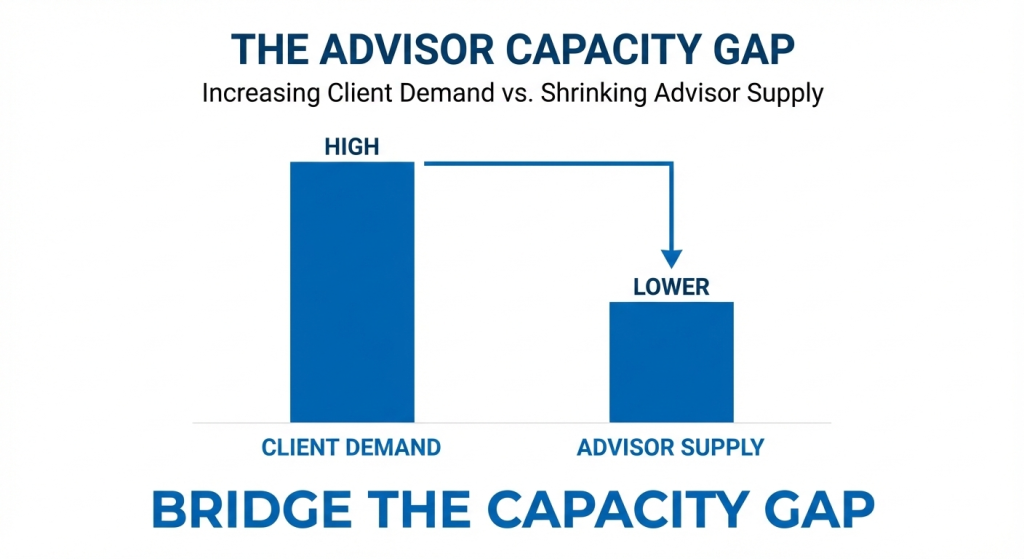
The bigger issue is capacity:
- Most advisory firms don’t have an in-house tax team, and
- Advisors don’t have hours to dig through rules, exceptions, and edge cases for every meeting.
When that research is rushed (or handled ad-hoc), the risk isn’t just a wrong number. It’s unclear advice that’s hard to defend later because there’s no clear paper trail showing what was considered and why.
This is why it helps to define a clean boundary—what “tax planning” means for an advisor, and what crosses into tax preparation, so the team can deliver value while staying compliant.
What Counts as Tax Planning for Financial Advisors (And What Doesn’t)?
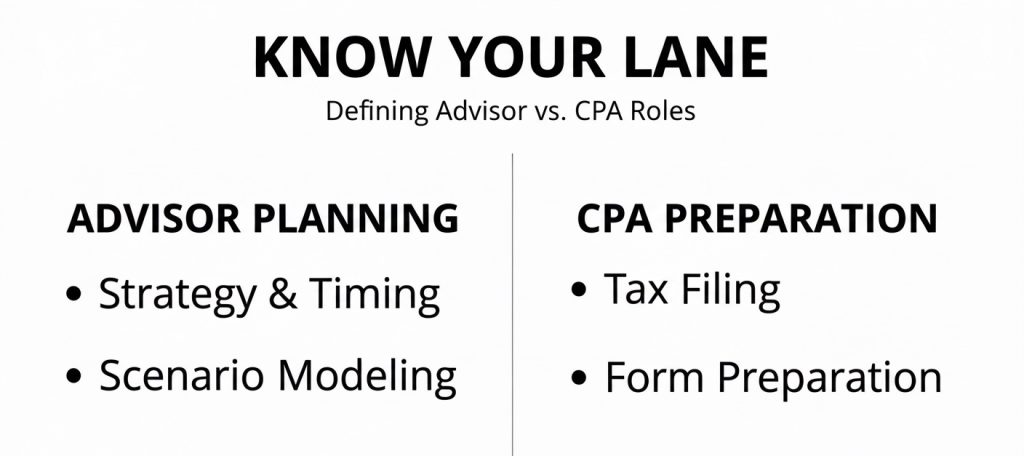
For most advisory teams, “tax planning” simply means helping a client make better decisions by pointing out tax impact and timing before the client takes action.
It includes things like choosing
- When to take income,
- Which account to pull from first, or
- How to structure a move (sell now vs. later, convert now vs. later), so the client doesn’t get surprised by taxes.
Where it stops is just as important: Advisors shouldn’t cross into “tax prep” tasks like preparing returns, entering filing numbers, or telling a client exactly what to put on a specific tax form.
A simple way to keep the boundary clear is to use planning language (“Here are options and tradeoffs to discuss with your CPA”) and document that the CPA (or enrolled agent/attorney) is the one who files and gives final tax advice.
CPA Pilot is designed to support that planning-only role by helping advisors research and explain planning options and then generate clean documentation (like a memo or CPA handoff notes) that stays inside the advisor’s lane.
Once the boundary is clear, the next challenge is execution—most teams get stuck on the slow parts: research and write-ups.
Break the Bottleneck: Faster Tax Research and Cleaner Write-Ups
The real slowdown usually isn’t the client meeting; it’s everything that happens around it:
- Looking things up,
- Double-checking details, and then
- Turning messy notes into something that’s clear enough to share (internally, with a client, or with a CPA).
When this work is done manually, it often turns into half-finished drafts, missing context, and “tribal knowledge” that lives in someone’s head instead of in a file.
A second bottleneck is documentation pressure. For example, SEC-registered investment advisers have recordkeeping duties under Rule 204‑2, which includes keeping certain written communications relating to their advisory business for required retention periods.
That’s why firms increasingly want meeting outputs (summaries, rationale, next steps, and handoff notes) to be consistent and easy to store—because the cost of “we’ll remember later” adds up fast.
Finally, generic AI can make this worse instead of better: if the output is uncited, unstructured, or hard to trace back to a reliable source, teams still have to redo the work; plus they inherit new review risk.
The goal isn’t “more AI text”; it’s faster research and cleaner, reusable documentation that fits advisory workflows.
So what should an advisor-grade AI tool actually do day-to-day beyond answering questions?
What Financial Advisors Should Expect From AI Tax Assistants?
An advisor-grade AI Tax Assistant should do more than “answer questions”; it should show where the answer came from.
In practice, that means
- Responses that link back to original authority sources (like IRS publications, forms instructions, and state guidance), so the advisor can quickly verify and confidently explain the logic.
- Next, it should help with “what-if” decisions, not just definitions.
- For example, instead of giving a generic explanation of NIIT or RMDs, it should compare two realistic choices side-by-side (timing, tradeoffs, and client impact), using the inputs an advisor already knows from meetings and documents.
- Finally, it needs to create client-ready and CPA-ready outputs automatically. That includes plain-English client summaries, internal meeting notes, and a clean “handoff brief” a CPA can review without starting from scratch plus compliance guardrails (like staying in planning scope and adding appropriate disclaimers) built in.
Once AI can research, compare options, and generate clean outputs, the next step is turning that into a repeatable workflow from documents to decisions.
How CPA Pilot Turns Documents Into Tax Planning Decisions?
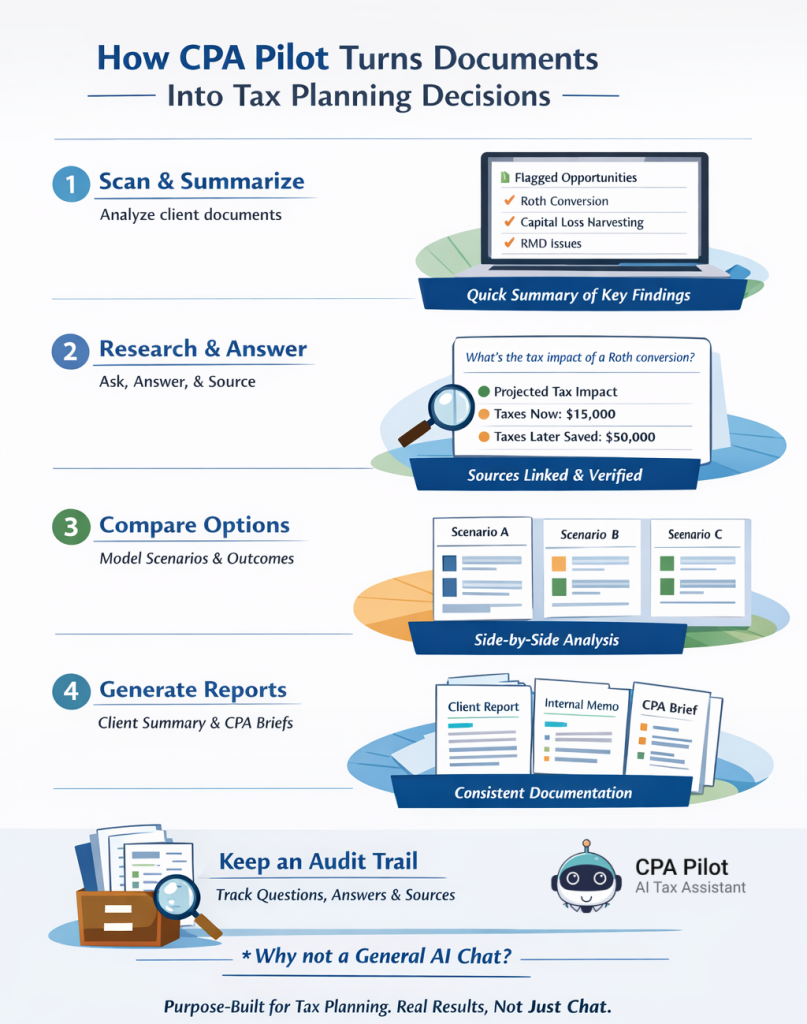
A practical workflow starts with inputs you already have, so the tool should work from real client documents (like prior-year returns, account statements, and plan notes) instead of forcing you to “type everything out” from scratch.
- The first step is to scan those documents to surface relevant flags and opportunities, then turn them into a short, organized list the advisor can quickly review before a meeting.
- Next comes a clean research + decision loop: ask a planning question, get a structured answer, and keep the supporting sources attached so it’s easy to validate and share with a CPA when needed.
- The “compare” step is where workflow tools earn their keep—model two or three realistic choices (timing, sequence, tradeoffs), so the client sees a decision, not a wall of text.
- The final step is instant documentation: generate a client summary, an internal memo/checklist, and a CPA brief from the same work, so nothing gets lost and the rationale stays consistent across the team.
- Over time, the tool should also keep a searchable history of what was asked, what was answered, and what sources were used, so future reviews aren’t starting at zero.
Once there’s a workflow, the natural question becomes: why not just use a general AI chat tool or keep doing manual research—what’s the real difference in outcomes?
Why CPA Pilot Outperforms Generic AI and Manual Tax Research?
The difference isn’t “AI vs. no AI”; it’s whether the tool is built for advisor planning work or for general conversation.
Generic AI can be helpful for brainstorming, but it often lacks the structure and consistency teams need when the output has to be shared with a client, reviewed internally, or handed to a CPA.
Here’s the simplest way to think about it: CPA Pilot is designed to produce planning outputs that look like real deliverables (memos, checklists, briefs), not just answers.
It also focuses on citation-backed, regulation-linked responses and workflow support (review → research → compare → document → track), while generic tools and manual research usually leave advisors stitching everything together on their own.
CPA Pilot vs Generic AI and Manual Research – Quick Comparison
| What matters to advisors | CPA Pilot | Generic AI / Manual research |
|---|---|---|
| Built purpose | Built for advisor tax planning workflows. | General-purpose or unstructured. |
| Answer quality | Cited, regulation-linked responses. | Often vague, uncited, or scattered across sources/notes. |
| Workflow support | Designed around planning steps, not one-off chats. | DIY process; depends on the user every time. |
| Documentation | Auto-generated, structured outputs. | Manual write-ups or missing documentation. |
| Security posture | Built for advisor-grade data handling. | Higher risk with consumer-level tools or ad-hoc sharing. |
Once the “why this tool” is clear, the most convincing proof is real scenarios—here are the use cases that show measurable impact in everyday advisory work.
Real Use Cases: How Advisors Use CPA Pilot for Tax Planning?
- Equity comp planning: Compare timing choices around ISOs/NSOs and generate a clear memo for the client and CPA.
- Business owners: Organize entity/comp/retirement questions into a structured plan and document the rationale.
- Pre-retirees: Map withdrawal order + Roth conversion timing and turn it into a simple client summary.
To use these workflows safely at scale, firms also need strong compliance, security, and smooth CPA collaboration.
Built-In Compliance, Data Security, and CPA Collaboration
“Helpful” isn’t enough in a regulated environment—tools also have to be safe to use and easy to supervise.
Regulators have shown they take recordkeeping seriously: The SEC said that in fiscal year 2024 it brought recordkeeping cases against more than 70 firms, resulting in more than $600 million in civil penalties. (Source)
That’s why firms care about where client conversations live, how they’re retained, and whether a tool supports a repeatable, reviewable process.
CPA Pilot addresses this with guardrails designed for advisory planning: It keeps outputs inside planning scope (with disclaimers), avoids “tax prep” behavior, and supports structured documentation that can be saved and reviewed later.
It also aims to reduce sensitive-data risk by limiting how client information is reused and making it easier to generate controlled, shareable handoffs rather than copying raw chat threads into email.
Just as important, it supports smoother collaboration: Advisors can create a CPA-ready brief that summarizes the question, client facts, scenarios reviewed, and the reasoning—so the CPA can confirm, adjust, and file with confidence.
This clarifies ownership: the advisor leads planning decisions, while the CPA/attorney owns filing and final tax/legal interpretation.
With compliance and collaboration covered, the next step is rollout—how to introduce CPA Pilot without disrupting the team or creating process chaos.
How to Roll Out CPA Pilot in Your Advisory Firm?
Start with one repeatable planning moment where the team already feels the most friction—something like
- Annual tax reviews,
- Roth review conversations, or
- Equity-comp planning
So adoption is simple and results are easy to spot.
Keep the first rollout to a small group (one team or a few advisors) and define what “done” looks like:
- A saved client summary, a CPA brief, and an internal note that can be reused later.
- Next, turn wins into a lightweight SOP: Save the best prompts as templates and standardize outputs (same headings, same disclaimers, same handoff format), so quality doesn’t depend on who asked the question.
This is also where firms set guardrails: what documents can be uploaded, what must be redacted, where outputs are stored, and who reviews them.
- Then scale with metrics, not hype. Track time saved per case, number of planning opportunities surfaced, and the percentage of meetings with complete documentation.
- This matters because the industry is facing a capacity crunch—McKinsey estimates wealth management could be short 90,000 to 110,000 advisors by 2034 at current productivity levels so tools that remove low-value work directly support growth without burning out teams [source].
Once a pilot group is getting consistent, documented outputs, the next step is simple: let more advisors test it with the same templates and guardrails.
Try CPA Pilot for free and see how it turns tax questions into planning clarity with audit-ready outputs and scalable documentation your team can reuse.
Book a free demo and see it in action!!!
FAQs – AI Tax Planning Assistant for Advisors
How accurate is CPA Pilot compared to a human tax expert?
CPA Pilot provides expert-level accuracy using IRS and state-code sources, reducing human error and speeding research. It includes citations for validation, making it ideal for client-facing compliance.
Does CPA Pilot offer pricing plans for individual advisors and teams?
Yes, CPA Pilot offers tiered plans for solo advisors, boutique firms, and enterprise teams, with access levels, support, and usage limits tailored to firm size and workflow needs.
Can CPA Pilot be used for international tax scenarios?
CPA Pilot focuses on U.S. federal and state tax guidance. It is not designed for international tax regimes or treaties but flags potential cross-border considerations for CPA review.
Is training or onboarding required to use CPA Pilot effectively?
Minimal training is required. CPA Pilot includes built-in prompts, templates, and workflows so advisors can begin planning, documenting, and collaborating without needing technical setup.
How is CPA Pilot different from AI used by tax preparers?
CPA Pilot focuses on planning, not preparation or return filing. Unlike preparer-focused AI, CPA Pilot helps advisors model timing, compare scenarios, and generate planning notes—without handling tax return inputs or filing forms.
Disclaimer: This article is provided by CPA Pilot for educational purposes. While we may offer tax software/services, the information here is general and may not address your specific facts and circumstances. It does not constitute individual tax, legal, or accounting advice. U.S. federal and State Tax laws change frequently; please consult a qualified tax professional before acting on any information.

![Last-Minute Mid-Year & Year-End Tax Planning Using AI – [2026 GUIDE]](https://www.cpapilot.com/blog/wp-content/uploads/2025/09/Last-Minute-Mid-Year-Year-End-Tax-Planning-Using-AI.png)