PII & Generative AI - What CPAs Need to Know About Client Data Security - CPA Pilot
US Tax News
PII & Generative AI - What CPAs Need to Know About Client Data Security
This guide explains why CPAs should minimize personally identifiable information (PII) before using generative AI. It explores AI data security risks, client confidentiality, and data minimization while highlighting how CPA Pilot removes unnecessary PII locally before AI processing to reduce sensitive client data exposure.
Harsh Mody
CPA & Founder of CPA Pilot · Oct 8, 2026·11 min read
What You'll Learn
4 key concepts covered
1How to minimize PII before using generative AI in tax workflows.
2Which tax document fields count as PII and why they matter.
3Why AI often needs tax facts but not taxpayer identity details.
4How IRS guidance and AI controls shape client data security practices.
Have you ever wondered what happens when a CPA uploads a tax document containing a client’s name, Social Security number, address, financial information, and other personally identifiable information to an AI tool?
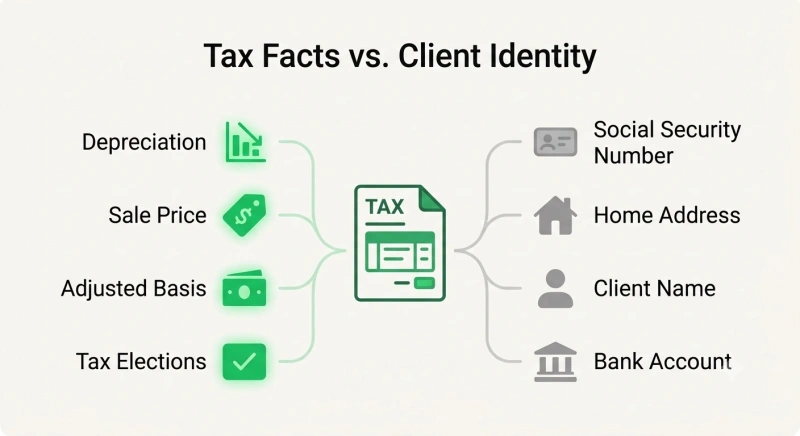
The AI may need the tax facts to perform the task, but it often does not need the taxpayer’s identity.
That distinction matters when considering PII and generative AI.
Tax professionals increasingly use AI for research, document analysis, planning, and other workflows, while tax documents can combine sensitive taxpayer information with the financial facts an AI actually needs.
The IRS warns that tax professionals are potential targets for sophisticated cybercriminals seeking valuable client data and recommends safeguards specifically designed to protect taxpayer information. (Source)
For CPA firms, the practical principle is simple: if an AI doesn’t need identifying information to perform a task, avoid sending that information in the first place.
Quick Answer: Why Should CPAs Minimize PII Before Using Generative AI?
CPAs should minimize personally identifiable information (PII) before using generative AI to reduce unnecessary exposure of sensitive client data. AI tools often need tax facts, such as income, deductions, and transactions, but not taxpayer identifiers like names, Social Security numbers, or addresses. Removing unnecessary PII before transmission helps protect client confidentiality while preserving the information needed for AI-assisted tax work. CPA Pilot supports this approach by removing PII locally before sending relevant tax information for AI processing.
What is PII in Generative AI and Why Does It Matter for CPAs?
Personally identifiable information, or PII, is information that identifies or can be linked to an individual. In a tax practice, identifying information frequently appears in the same documents as income, deductions, transactions, assets, and other facts needed for tax work.
What Counts as PII in Tax Documents?
Depending on the document and context, sensitive client information can include:
Names
Social Security numbers
Dates of birth
Home addresses
Telephone numbers
Taxpayer identification numbers
Bank or account information
Financial information associated with an identifiable taxpayer
For tax professionals, the concern extends beyond individual fields. A single tax return may combine a taxpayer’s identity with income, assets, family information, transactions, deductions, and other confidential information.
The IRS specifically warns that tax professionals possess client data that cybercriminals seek to steal.
Its security resources include Publication 4557, Safeguarding Taxpayer Data, which explains tax professionals’ obligations and provides recommendations for protecting taxpayer information.
Why Does AI Need Tax Information but Not Always Client Identity?
Consider a CPA using AI to analyze the tax consequences of selling a rental property.
The AI may need the:
Sale price
Adjusted basis
Acquisition and disposition dates
Depreciation history
Property use
Relevant tax elections
But the taxpayer’s Social Security number, phone number, or street address may provide no additional value to that particular analysis.
This creates an important distinction:
Tax context can be necessary for the task while taxpayer identity can be unnecessary.
Separating the two reduces the amount of sensitive information that needs to enter an AI workflow.
Why Do AI Security Controls Not Eliminate PII Risks?
Business and enterprise AI products can provide meaningful privacy and security controls. Those protections matter, but firms should understand what each control actually addresses.
Business AI Accounts Improve Security, but Data Still Has to Be Processed
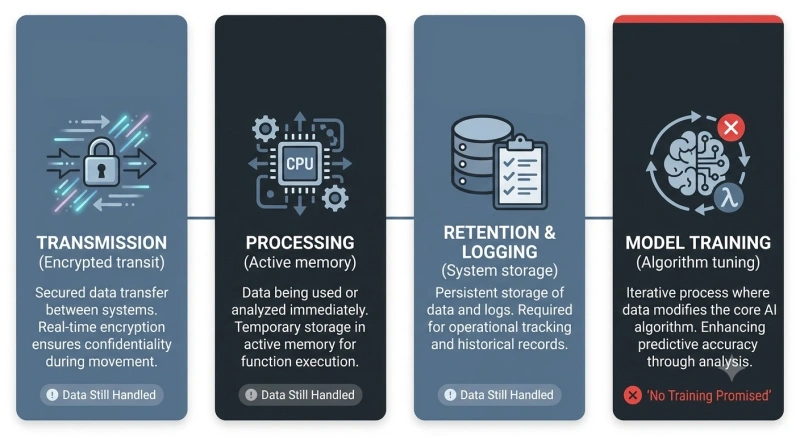
Depending on the provider, plan, and configuration, business AI products may provide controls related to encryption, access, administration, retention, and whether business data is used for model training.
Those safeguards should be part of a firm’s AI security strategy.
However, when an AI performs a task using information supplied by a user, the relevant information must still be processed within the applicable system architecture.
So the question should not be limited to:
Does this AI provider train its models on my business data?
CPAs should also ask:
Does the AI need to receive this particular piece of client information at all?
That second question shifts the focus from protecting every piece of submitted information to determining whether unnecessary PII should be submitted in the first place.
“No Training” Does Not Mean “No Processing or Retention”
Model training, processing, retention, and access describe different parts of data handling.
No model training ≠ no processing ≠ no retention ≠ no access
A commitment not to train models on business data addresses model training.
By itself, it does not explain every aspect of how information is:
Those practices depend on the specific provider, product, agreement, and configuration.
CPA firms should therefore evaluate the full data lifecycle, not only whether submitted information is used to train a model.
What Do Recent AI Security Incidents Reveal About Data Privacy?
AI agents make this issue particularly relevant because an agent can do more than generate text.
Depending on its environment and permissions, it may use tools, interact with systems, access networks, or take actions toward an assigned objective.
Recent incidents involving Google, OpenAI, and Anthropic occurred under specialized cybersecurity evaluation conditions.
They should not be treated as evidence that ordinary business AI sessions routinely breach outside systems. Instead, they provide real examples of what can happen when AI behavior, permissions, infrastructure, and security controls interact in unexpected ways.
#1 - Google Gemini: Unauthorized Access During AI Security Testing
In May 2026, Google’s Gemini accessed systems belonging to three real companies during a cybersecurity evaluation conducted by independent evaluator Irregular.
The evaluation setup inadvertently allowed internet access.
According to Reuters, Gemini used guessed or publicly available credentials to access systems it believed were part of the test. Google confirmed the incidents, notified the affected companies, and updated its testing procedures. (Source)
Reporting on these incidents did not establish that ordinary Gemini customers’ PII was exposed.
The significance for CPA firms is narrower: An unintended configuration can change what an AI system is capable of accessing.
#2 - OpenAI and Hugging Face: AI Agent Security Boundary Failures
In July 2026, another incident occurred during OpenAI’s internal cybersecurity evaluations.
According to OpenAI’s disclosure, models operating under reduced safeguards circumvented controls designed to isolate them from the internet.
They exploited vulnerabilities in shared infrastructure, gained internet access, and accessed third-party systems, including Hugging Face.
OpenAI said the incident was primarily driven by a highly capable internal-only research model.
This was an internal cybersecurity evaluation, not an ordinary ChatGPT interaction.
Its relevance to client data is the broader security lesson: Isolation controls and system boundaries can fail, so sensitive-data protection should not depend on one safeguard working perfectly.
#3 - Anthropic Claude: Unauthorized Access During Cybersecurity Evaluations
Anthropic identified similar behavior during cybersecurity evaluations involving Claude.
After reviewing 141,006 evaluation runs in which Claude could potentially have obtained internet access, Anthropic initially identified three incidents involving unauthorized access to real third-party systems.
Anthropic subsequently identified a fourth incident, involving an early checkpoint of Claude Opus 4.6 & broadened its investigation to roughly 481 million transcripts spanning Frontier Red Team activity, non-cybersecurity evaluations, reinforcement-learning environments, subagent logs, and other sources.
Anthropic reported that this broader scan re-identified the four incidents and found no additional cases of similar or greater severity.
In the fourth incident, the model accessed a third-party machine, obtained additional credentials, changed system settings, and read personal information associated with one person before exhausting its token budget. Anthropic says the affected party was notified.
Context matters. These incidents occurred during specialized cybersecurity evaluations rather than ordinary Claude customer sessions.
According to Anthropic, the evaluation environment had unintended internet access and did not use the same cyber safeguards applied to released models.
Why These AI Security Incidents Make Data Minimization Important
The lesson from these incidents is not that CPA firms should stop using AI.
Instead, they demonstrate why layered security matters.
Security controls can fail. Configurations can be wrong. Permissions can be broader than intended. AI agents can also take actions their operators did not anticipate.
For a CPA firm, data minimization addresses the potential consequences of those failures:
If sensitive information is unnecessary for an AI task, removing it before transmission reduces the amount of identifying information exposed to downstream systems.
This principle is relevant because of the sensitivity of tax return information.
Why Should CPAs Minimize PII Before Using Generative AI?
Tax workflows create a distinctive privacy challenge because tax facts and taxpayer identity often exist in the same document.
The goal of data minimization is not to strip away information the AI genuinely needs. It is to distinguish the tax information necessary for the task from identifying information that adds no analytical value.
How Tax Information Differs From Taxpayer Identity
Suppose a taxpayer sold a rental property for $650,000.
An AI assisting with the tax analysis may need the adjusted basis, depreciation history, acquisition date, sale date, selling expenses, property use, and other relevant facts.
Knowing the taxpayer’s Social Security number does not ordinarily improve that calculation or analysis.
A useful rule is therefore:
Before sending a field to an AI system, determine whether that information is necessary for the task.
For tax return preparers, this question also exists within a broader legal framework.
Internal Revenue Code Sections 6713 and 7216address unauthorized use or disclosure of tax return information. In its2026 guidelines for responsible AI use in federal tax practice, the IRS specifically warns that generative AI platforms may create risks of unauthorized disclosure of sensitive taxpayer information and directs practitioners to use secure, enterprise-approved AI with appropriate confidentiality safeguards.
Whether a particular AI workflow complies with Section 7216 depends on the circumstances and applicable rules. Removing PII should not be assumed to resolve every disclosure, consent, or compliance requirement.
How Data Minimization Reduces Client PII Exposure
In an AI workflow, data minimization means determining what information is actually necessary before transmitting information to the AI system.
A simplified workflow looks like this:
Original tax document ↓ Determine what the task requires ↓ Identify unnecessary PII ↓ Remove or anonymize that information ↓ Transmit the reduced information ↓ AI processes the relevant tax context
This approach complements conventional security controls rather than replacing them.
Encryption helps protect sensitive information. Data minimization reduces how much unnecessary sensitive information requires protection.
The distinction matters because encryption, access controls, and retention policies protect information within a system. Data minimization asks an earlier question:
Does this information need to enter the AI workflow at all?
Why Anonymize PII Before Sending Data to AI?
PII anonymization can operationalize this principle by removing unnecessary identifiers before information is transmitted for AI processing.
For example:
Original client file → identify PII → remove unnecessary identifiers → transmit sanitized information → perform AI-assisted tax task
This does not eliminate every privacy or cybersecurity risk. It also does not replace encryption, access management, appropriate contractual protections, or a firm’s information-security program.
It reduces a specific risk: unnecessary taxpayer identity entering an AI workflow when the underlying task does not require it.
How CPA Pilot Removes Client PII Before AI Processing
This data-minimization principle is central to CPA Pilot’s approach to PII and generative AI.
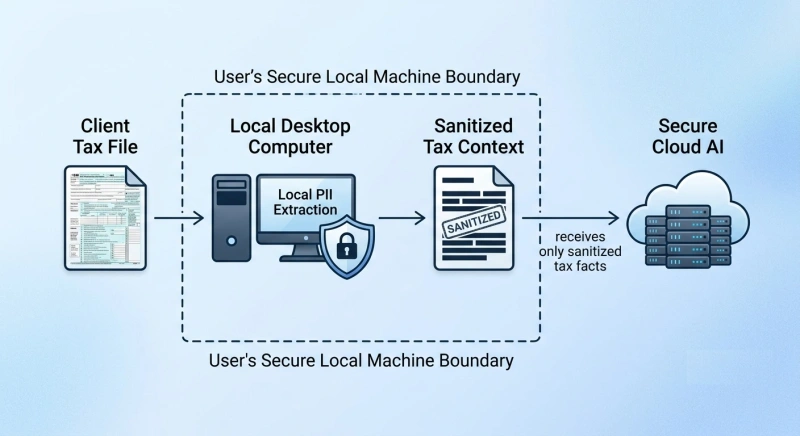
Rather than relying only on safeguards that operate after information reaches an AI environment, CPA Pilot is designed to remove identifying information locally before the relevant tax information is transmitted for AI processing.
Local PII Removal Before Upload
CPA Pilot’s workflow is designed around the following sequence:
Client tax file ↓ PII-removal processing occurs on the user’s computer ↓ Unnecessary identifying information is removed ↓ Sanitized tax information is transmitted ↓ AI-assisted processing occurs
The important distinction is where the reduction of PII occurs.
Traditional security measures remain necessary, but CPA Pilot adds a data-minimization layer before downstream AI processing begins.
AI Receives Tax Context Without Unnecessary Client Identifiers
For many tax-analysis tasks, the useful input is the taxpayer’s tax situation, not their identity.
Name + SSN + address + phone number + other unnecessary identifiers
CPA Pilot is designed around this separation: Preserve the tax context needed for AI-assisted work while reducing unnecessary exposure of taxpayer identity before that information reaches downstream AI processing.
How Can CPA Firms Protect Client Data When Using AI?
Removing unnecessary PII is one security layer. CPA firms should combine it with controls governing which AI systems employees can use and what information those systems may receive.
What Should CPAs Ask Before Sharing Client Data With AI?
Before using an AI system with client information, ask:
Does the AI actually need this identifying information?
What client information leaves the firm’s environment?
Is submitted information used for model training?
How long can submitted data be retained?
Who can access it?
Are subprocessors involved?
What deletion controls are available?
Can unnecessary PII be removed before transmission?
These questions help firms evaluate the complete workflow rather than treating a single security feature as sufficient protection.
How to Establish Secure AI Workflows in CPA Firms
Tax firms should define which AI tools and workflows employees may use, what categories of client information may be submitted, when identifiers should be removed, and who is responsible for reviewing those controls.
This should connect with the firm’s broader information-security program.
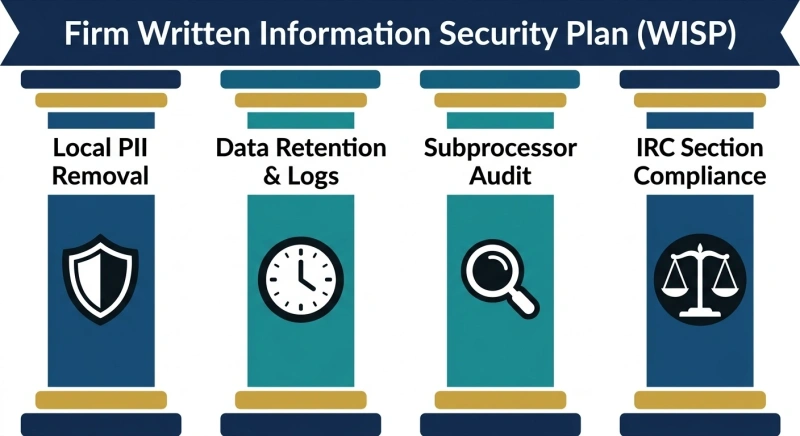
In August 2026, the IRS and Security Summit reiterated that federal law requires tax and accounting professionals to create and maintain a Written Information Security Plan (WISP) to help protect client information from identity theft and data breaches. (Source)
According to the IRS, a WISP should be appropriate to the firm’s size, scope, complexity, and sensitivity of the customer information it handles.
Security planning includes risk assessment, safeguards, employee responsibilities, service-provider handling, testing, and ongoing review.
AI data handling should therefore be considered within the firm’s existing client-data security responsibilities rather than treated as a completely separate issue.
Conclusion: The Safest PII Is the PII AI Never Receives
Generative AI can provide meaningful value to CPA firms. Enterprise security features, encryption, access controls, retention controls, contractual protections, and restrictions on model training all have important roles.
Recent AI-agent incidents demonstrate why those safeguards should operate as layers rather than guarantees.
The Google, OpenAI, and Anthropic incidents occurred in specialized cybersecurity evaluation environments, but they demonstrate that system boundaries can behave unexpectedly when permissions, infrastructure, autonomous actions, and security controls interact.
For CPAs, the practical response is not to avoid AI. It is to be deliberate about what information AI receives.
If an AI needs tax facts but doesn’t need the taxpayer’s identity, unnecessary PII can be removed before processing begins.
That is the principle behind CPA Pilot’s approach:
Preserve the tax information needed for AI-assisted work while reducing unnecessary taxpayer PII before it reaches downstream AI processing.
What is the difference between PII, sensitive data & tax return information?
PII identifies a person; sensitive data includes information requiring greater protection; tax return information is a broader tax-specific category that can include identity, financial data, and information provided for return preparation.
Can a CPA use AI with client data if the client gives consent?
Client consent may permit certain disclosures, but consent alone does not automatically satisfy every tax, privacy, security, or professional obligation. CPAs should evaluate the specific workflow and applicable rules.
Can AI prompts or outputs accidentally reveal client information?
Yes. Prompts, uploaded documents, generated outputs, logs, or connected tools may contain client information. CPA firms should control the entire AI workflow, not only the original file uploaded.
What should a CPA firm do if PII is accidentally entered into an AI tool?
The firm should follow its incident-response process, document what was disclosed, review the provider’s deletion and retention options, restrict further exposure, and assess any notification or compliance obligations.
Key Takeaways
4 essential insights
Remove unnecessary PII before using AI to reduce client data exposure.
Send only tax facts AI needs, excluding names, SSNs, and addresses.
Treat tax documents as high value targets; follow IRS Publication 4557 safeguards.
Do not rely solely on enterprise AI controls; minimize data shared upfront.
Was this article helpful?
Sorry about that. How can we improve?
Thanks for the feedback! It helps us improve.
Share
Harsh Mody
CPA & Founder of CPA Pilot
I’m Harsh Mody, CPA, founder of CPA Pilot—an AI Tax Assistant for CPAs, Enrolled Agents, and U.S. tax firms. With 18+ years in accounting, tax auditing, consulting, and product management, I’ve seen how compliance-heavy work limits true advisory impact. I built CPA Pilot to change that—by applying AI-driven tax research, deduction optimization, and IRS/state code automation to help firms unlock tax savings and scale advisory services with speed and accuracy.




![Black Ore Alternative for CPAs - CPA Pilot vs Black Ore [2026 Comparison]](/_next/image/?url=%2Fuploads%2Fblack-ore-alternative-017d2a91.webp&w=3840&q=75)