

![Best AI Tax Planning Tools for CPAs [2026 Comparison Guide]](https://www.cpapilot.com/blog/wp-content/uploads/2026/01/AI-Tax-Planning-Tools-Comparison.png)

How CPAs Use AI for Real Estate Tax Planning in 2025?

[Last Updated on 2 months ago]
Have you ever wondered why CPAs and EAs who serve landlords, STR hosts, and real-estate investors are moving from manual spreadsheets to AI-assisted tax workflows right now?
In 2025, CPAs and Enrolled Agents (EAs) serving landlords, short-term rental (STR) hosts, and real estate investors are rapidly transitioning from manual spreadsheets to AI-assisted tax workflows. This shift is driven by simultaneous changes in the market, tax codes, and firm operations.
TL;DR – AI for Real Estate Tax Planning
- AI is transforming real estate tax planning for CPAs in 2025 by automating complex processes like:
- Determining Real Estate Professional Status (REPS)
- Classifying Short-Term vs. Long-Term Rentals (STR/LTR)
- Calculating §199A Qualified Business Income (QBI)
- Optimizing 1031 exchanges
- Benefits of AI in real estate tax planning:
- Streamlines workflows, making tax processes faster and more accurate
- Improves client communication and audit readiness
- Reduces review cycles and minimizes errors
- AI helps CPAs focus on:
- Strategic decision-making instead of manual tasks
- Creating defensible, citation-backed tax positions
- The shift to AI-powered workflows is scalable, compliant, and boosts efficiency for real estate professionals.
- With CPA Pilot, CPAs can leverage AI-driven tools designed specifically for real estate tax workflows, enhancing productivity and accuracy in 2025 and beyond.
AI Tax Assistant such as CPA Pilot, are revolutionizing the way tax professionals approach real estate tax planning. By automating complex processes like material participation tests, rental classification (STR vs. LTR), and the optimization of Section 1031 like-kind exchanges, CPA Pilot enhances the efficiency, accuracy, and consistency of tax workflows, significantly reducing manual effort.
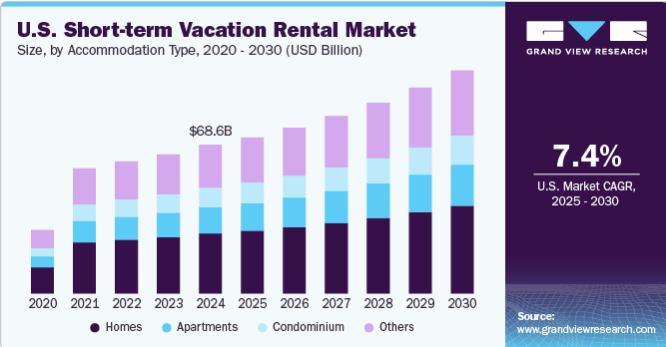
For example, with the U.S. short-term vacation rental market reaching $68.64 billion in 2024, tax filings have become more intricate. [Source]
CPA Pilot helps CPAs ensure the correct application of material participation rules, which determine whether losses are classified as passive or non-passive.
This classification often depends on Real Estate Professional Status (REPS) and the hours worked in real estate activities. With CPA Pilot, CPAs can efficiently track, compute, and document these critical details, providing defensible, IRS-compliant outputs.
As the tax landscape evolves, especially with the rebound of §1031 exchanges and the broader adoption of generative AI tools in firms (36% of business executives were experimenting with AI by late 2024), automation is becoming essential [source].
CPA Pilot enables tax professionals to automate detailed research, planning, and client communication workflows, helping firms stay agile, compliant, and competitive in an ever-changing environment.
Table of Contents
- What’s the Core Foundation of Real Estate Tax Planning, and what’s unique about it?
- Top Real Estate Tax Workflows to Automate with AI
- How to Roll Out AI Tax Planning Safely for Real Estate Firms?
- KPIs to Track When Using AI for Tax Planning
- Why Choose CPA Pilot for Real Estate Tax AI Workflows?
- FAQs – Real Estate Tax Planning using AI
What’s the Core Foundation of Real Estate Tax Planning, and what’s unique about it?
At its core, tax planning is about controlling timing, character, entity pathway, basis, and documentation—so results are predictable, defensible, and cash-flow friendly.
- Timing (when income/expenses hit): Move income or deductions across years where allowed under the general rules for income recognition (IRC §451) and deduction timing (IRC §461), or by changing accounting methods with a formal application (Form 3115).
- Character of Gains and Losses (§1231 Rules): Sales of business real property often fall under§1231—favorable when net gains, less favorable when net losses. Getting character right affects rates and NOLs.
- Entity Selection (S Corp vs C Corp): For closely held practices, the entity choice usually comes down to pass-through taxation versus entity-level taxation.
An S corporation is simply a corporation that elects Subchapter S so profits and losses pass through to shareholders (generally no entity-level income tax). It files Form 1120-S, and owner-operators must take reasonable compensation as wages; remaining distributions typically aren’t subject to self-employment tax.
By contrast, a C corporation is the default corporate form, pays corporate income tax at the entity level, files Form 1120, and dividends are taxed again to shareholders—i.e., potential double taxation (see Publication 542 — Corporations).
Why it matters for Real Estate Tax planning?
This choice directly affects payroll design, basis building, eligibility for the §199A qualified business income deduction (generally pass-throughs only; IRS QBI FAQs), and long-term exit paths.
- Basis and At-Risk Limitations: Track initial and adjusted basis (Pub. 551) and apply the at-risk rules using Form 6198 so losses don’t outpace economic investment.
- Documentation Requirements and Audit Readiness: Use contemporaneous records for travel/meals/auto per Pub. 463, and set written capitalization policies to leverage the tangible property (“repair”) regs (see IRS Tangible Property Regulations and the de minimis safe harbor).
What’s Unique about Real Estate AI Automation?
Transactions are long-lived and basis-sensitive, allocations often run through partnerships, and small documentation misses (e.g., method changes or capitalization policies) can swing multi-year cash tax.
That’s why real-estate planning leans heavily on method control, basis governance, and entity allocation hygiene—before you layer on advanced workflows.
With when and what handled (timing and character) and who clarified (entity pathway), the last planning lever is how you execute consistently.
That’s where repeatable, AI-assisted workflows shine—turning complex real-estate rules into step-by-step checklists, memos, and client communications your team can run on autopilot.
Top Real Estate Tax Workflows to Automate with AI
Before you dive in: think of automation as standardizing inputs, the tests you run, and the outputs you ship.
For each area below, you’ll capture a small fact set (property mix, hours, booking patterns, basis data), let the workflow apply the governing rules, and export two deliverables: a partner-ready summary and a client-facing memo.
The goal isn’t to replace judgment—it’s to make your process consistent, citation-backed, and easy for juniors to repeat file after file.
1. REPS Qualification and Material Participation Tests
Automate (rules lens):
- Track hours by activity; map to material-participation tests.
- Prompt for grouping elections and evidence (logs, calendars, emails).
- Flag weak points (insufficient hours, services characterization, record gaps).
Mini-workflow (HowTo):
- Intake: roles, hours by property/activity, ownership, advisors involved.
- Evaluate: AI runs material-participation tests; suggests grouping where appropriate.
- Document: generate a citation-backed memo with assumptions/risks.
- File & review: save to DMS; route to partner for sign-off.
Outputs: Partner one-pager + client memo; checklist of documents to retain.
2. STR vs LTR Classification and Passive Activity Exceptions
Automate:
- Compute average guest stay and services provided to assess material participation;
- Apply the seven IRS tests (e.g., 500+ hours, 100+ hours facts-and-circumstances) for non-passive status;
- Surface filing narratives.
Mini-workflow:
- Intake: booking durations, service details, platforms used, logged hours.
- Classify: AI evaluates against Pub. 925 tests and flags grouping elections.
- Explain: Auto-draft plain-English client email with outcomes and evidence needs.
- Package: Attach an audit-ready checklist.
Outputs: Classification report; client email; evidence list.
3. §199A and QBI Calculations with Aggregation and Safe Harbors
Automate:
- RREE safe harbor checks; SSTB screen where relevant.
- Wage/UBIA allocation, especially across multiple entities/K-1s.
- Aggregation recommendations with rationale.
Mini-workflow:
- Intake: ledgers, K-1 footnotes, asset basis/UBIA, wage data.
- Compute: AI calculates tentative QBI, wages, UBIA; proposes aggregation.
- Summarize: produce a partner summary + client explanation with assumptions.
- Archive: log decisions and supporting cites for the reviewer.
Outputs: QBI calculation pack; aggregation memo; client summary.
4. Depreciation Schedules, Bonus/ADS Elections, and Cost Seg
Automate:
- Build depreciation schedules; test for bonus/ADS and mid-quarter triggers.
- Detect potential method changes (§481(a)) and elections.
- Create a first-year cash-tax plan with reminders.
Mini-workflow:
- Intake: asset list, in-service dates, purchase allocations.
- Model: AI generates schedules; flags mid-quarter/ADS and method-change issues.
- Communicate: export a “year-one plan” with elections and timing notes.
- Calendar: auto-create reminders for filings/elections.
Outputs: Depreciation schedule; year-one plan; election checklist.
5. §1031 Exchange vs Installment Sale Comparison Modeling
Automate:
- Side-by-side tax and cash-flow modeling over 3–5 years.
- Deadline tracking; recapture exposure notes; “what-if” toggles.
- Client-ready decision memo with pros/cons and assumptions.
Mini-workflow:
- Intake: basis, expected boot, recapture exposure, replacement timeline.
- Compare: AI models 1031 vs installment, highlighting cash/tax timing.
- Decide: generate a recommendation memo with required steps and deadlines.
- Track: add deadline reminders to the firm calendar; store supporting docs.
Outputs: Comparison model PDF/Excel; client decision memo; deadline tracker.
You’ve got the workflows. Now make them safe, compliant, and repeatable so partners sleep well and juniors know exactly what “good” looks like.
How to Roll Out AI Tax Planning Safely for Real Estate Firms?
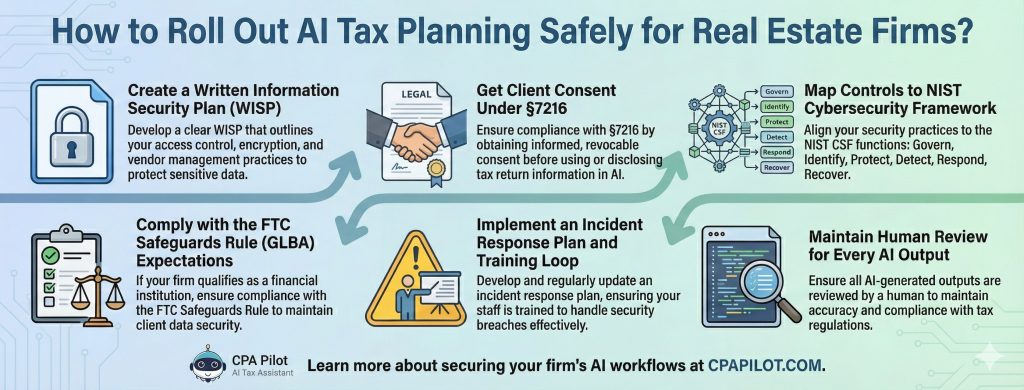
1) Create a Written Information Security Plan (WISP)
- Draft a Written Information Security Plan (WISP) that covers access control, encryption, vendor management, and incident response.
- Use the IRS’s practitioner guidance as your outline: Publication 4557 — Safeguarding Taxpayer Data and the “Protect your clients; protect yourself” hub (links to Publication 5709 on how to create a WISP).
- Keep the WISP short, specific, and tied to your actual tools (DMS, email, AI assistant).
2) Get Client Consent Under §7216
- Train staff on 26 U.S.C. §7216 (and the regs) governing a preparer’s use/disclosure of tax return information; get informed, revocable consent when required.
- Bookmark the IRS §7216 Information Center and the code text so your reviewers can check edge cases.
3) Map Controls to NIST Cybersecurity Framework
- Map your controls to the NIST Cybersecurity Framework 2.0 functions: Govern, Identify, Protect, Detect, Respond, Recover.
- Start small: admin-only access to AI Tax Assistants, MFA, least privilege, encrypted storage, and quarterly access reviews.
4) Comply with the FTC Safeguards Rule (GLBA) expectations
- If your firm is a covered “financial institution,” maintain a written security program, designate a qualified individual, and notify the FTC within 30 days of any qualifying “notification event” (≥500 consumers’ unencrypted info, or encryption + compromised key).
- Document how your AI workflows fit into your safeguards (risk assessments, vendor oversight, staff training).
5) Implement an Incident Response Plan and Training Loop
- Use AICPA guidance to define who triages incidents, who talks to clients, and how you preserve evidence.
- Run an annual table-top exercise; refresh new-hire training and sign-offs every busy season.
6) Maintain Human Review for Every AI Output
- Require partner or manager sign-off on every AI-generated memo, email, or model.
- Store: input facts, the prompt, the output, and citations in the workpapers—so you can re-perform the conclusion later.
- Add versioning and retention rules to your WISP so files aren’t overwritten.
One-page checklist to adopt now
- WISP finalized and circulated to staff.
- §7216 consent templates embedded in engagement/onboarding.
- Access controls + MFA on AI and DMS; quarterly access review scheduled.
- Safeguards Rule tasks assigned; 30-day breach notice procedure documented.
- Incident runbook + annual drill; training completed and logged.
KPIs to Track When Using AI for Tax Planning
You’ve put guardrails around the workflows. Now let’s talk about the wins you can measure—and why a purpose-built assistant is the simplest way to lock them in.
The KPIs that actually move
- Hours saved per engagement: Track prep time for memos, emails, and models (baseline 3–5 matters) → expect meaningful cuts once templates and checklists are standardized.
- Fewer review cycles: Count how many partner touchpoints it takes to approve a memo before vs. after adopting the workflows.
- Speed to client communication: Measure time from “question logged” to “client-ready email/memo delivered.”
- Training ramp for juniors: Compare time-to-independence on REPS, STR/LTR, §199A, depreciation, and 1031 vs. installment tasks.
- Error capture: Record issues found during review (missing cites, thresholds, dates) and watch them decline as prompts and checklists mature.
- How to measure: Add a one-sheet tracker to each matter (start/end timestamps, reviewer notes, defects found). Roll up monthly so partners see trendlines—not anecdotes.
Why Choose CPA Pilot for Real Estate Tax AI Workflows?
- End-to-end, not point-solution: Research → planning → client communications → staff SOPs—so a single prompt yields a citation-backed memo and a client-ready email, plus a checklist for your files.
- Real-estate first workflows: REPS/material participation, STR vs LTR, §199A/QBI, depreciation & cost seg, and 1031 vs. installment comparisons—all mapped to the steps you run in busy season.
- Built for review: Every output carries clear assumptions, references, and risks so reviewers can sign off quickly.
- Plays nicely with your stack: Works alongside common tax software and DMS; store prompts, outputs, and cites with your workpapers for re-performance.
- Team-friendly plans: Tiered options (message-based tiers and an unlimited tier), rollover messages, free trial, unlimited devices on most tiers (the unlimited tier limits devices), plus custom team plans on request.
FAQs – Real Estate Tax Planning using AI
How can AI sync with property-management systems?
AI ingests rents, expenses, leases via exports/API, normalizes to your chart, and tags anomalies for review.
Can AI maintain an audit trail for tax positions?
Yes—store prompts, inputs, outputs, cites, reviewer notes, and timestamps in workpapers; lock versions.
How does AI assist with multi-state filings for real-estate owners?
It maps property locations to state regimes, flags nexus, and drafts apportionment notes and filing calendars.
Does AI help evaluate Opportunity Zone investments?
It compares OZ eligibility, timing windows, basis step-ups, and exit deferral versus non-OZ scenarios.
How can AI handle §163(j) interest-limitation elections for real estate?
It tests interest caps, models the real-property trade/business election, and documents ADS impacts.
What about contributed property and §704(c) allocations in partnerships?
AI tracks built-in gain, selects 704(c) methods (traditional, curative, remedial), and drafts K-1 footnotes.
Can AI reconcile the fixed-asset ledger to tax depreciation schedules?
It matches books to tax, flags class life errors, and proposes adjust/journal entries with citations.
References Used
- https://www.aicpa-cima.com/resources/toolkit/tax-identity-theft
- https://www.aicpa-cima.com/resources/article/professional-responsibilities-in-data-security-for-tax-professionals
- https://www.ftc.gov/business-guidance/resources/ftc-safeguards-rule-what-your-business-needs-know
- https://nvlpubs.nist.gov/nistpubs/CSWP/NIST.CSWP.29.pdf
- https://www.nist.gov/cyberframework
- https://www.irs.gov/tax-professionals/section-7216-information-center
- https://www.law.cornell.edu/uscode/text/26/7216
- https://www.irs.gov/pub/irs-pdf/p4557.pdf
- https://www.irs.gov/tax-professionals/protect-your-clients-protect-yourself
- https://www.irs.gov/newsroom/basic-questions-and-answers-about-the-limitation-on-the-deduction-for-business-interest-expense
Disclaimer: This article is provided by CPA Pilot for educational purposes. While we may offer tax software/services, the information here is general and may not address your specific facts and circumstances. It does not constitute individual tax, legal, or accounting advice. U.S. federal and State Tax laws change frequently; please consult a qualified tax professional before acting on any information.

![Last-Minute Mid-Year & Year-End Tax Planning Using AI – [2026 GUIDE]](https://www.cpapilot.com/blog/wp-content/uploads/2025/09/Last-Minute-Mid-Year-Year-End-Tax-Planning-Using-AI.png)