


Fix IRS Rejection Codes – Causes, Examples & Step-by-Step Solutions

[Last Updated on 10 hours ago]
Why does the IRS reject e-filed tax returns and what do those cryptic rejection codes actually mean for your practice?
The IRS’s e-file system automatically screens every return against hundreds of business rules before acceptance, flagging discrepancies in Social Security numbers, prior-year AGI, dependent claims, and premium tax credit calculations.
TL;DR – IRS Rejection Codes
- IRS rejection codes are automated error messages triggered when your e-file fails IRS validation checks
- Most rejections come from mismatches in SSN, prior-year AGI, dependents, IP PIN, or Form 8962
- A rejected return is not considered filed and must be corrected before resubmission
- The IRS typically returns rejection or acceptance within minutes to a few hours
- Fixing one error may reveal others due to the validation cascade effect
- Always use official sources (IRS transcript, SSA records, IP PIN portal) instead of client memory
- Common high-impact errors include AGI mismatches, duplicate SSNs, and missing health coverage forms
- Prevent rejections by running pre-filing validation checks before submission
- Use AI tools like CPA Pilot to automatically detect inconsistencies, validate tax data, and reduce manual errors before filing
- Wait for IRS/SSA data updates (24–72 hours) before resubmitting certain corrections
- Repeated rejections may require identity theft verification or IRS escalation
When a tax return fails these checks, the system returns an IRS e-file rejection code, a specific alphanumeric identifier (like IND-517-01 or R0000-500-01) that tells you exactly what went wrong and what needs correction.
According to TIGTA’s February 2026 report on the 2025 filing season, programming gaps in 41 specific IRS business rules caused over 4,100 unnecessary rejections for Direct File users, while broader e-file systems continued flagging legitimate returns due to data mismatches and outdated validation logic. (Source)
The IRS provides a 5-day rejection grace period after the filing deadline for corrections, but each rejection still triggers client callbacks, data re-verification, and delayed refunds, compounding workload during peak weeks.
That’s why firms using CPA Pilot’s catch common IRS e-file rejection codes before submission, turning hours of rework into seconds of prevention.
Whether you’re battling repeated AGI mismatches, navigating IP PIN verifications, or untangling Form 8962 premium tax credit errors, this guide breaks down every major tax return rejection code, its root cause, and the exact steps to resolve it, so you can file tax returns faster, reduce client callbacks, and protect your firm’s reputation.
Table of Contents
- Understand IRS E-File Rejection Codes
- Identify Common IRS Rejection Codes and Causes [With Quick Fix]
- Explain Why Tax Returns Get Rejected Repeatedly?
- Identify Why Quick Fixes Cause Repeat Rejections
- How to Fix IRS Rejection Codes? [Step-by-Step]
- How to Prevent IRS e-File Errors Before Filing?
- How to Improve Tax Workflow Accuracy and Efficiency
- Answer FAQs About IRS Rejection Codes
Understand IRS E-File Rejection Codes
What IRS E-File Rejection Codes Mean?
IRS e-file rejection codes are standardized error identifiers that the IRS returns when an electronically filed tax return fails its automated Business Rules Check.
Think of them as the IRS’s real-time quality control system—before your return ever reaches a human reviewer, it’s scanned against 300+ validation rules covering taxpayer identity, filing status, dependents, credits, and math accuracy.
How the Tax Returns Rejection System Works – IRS validation system (MeF)?
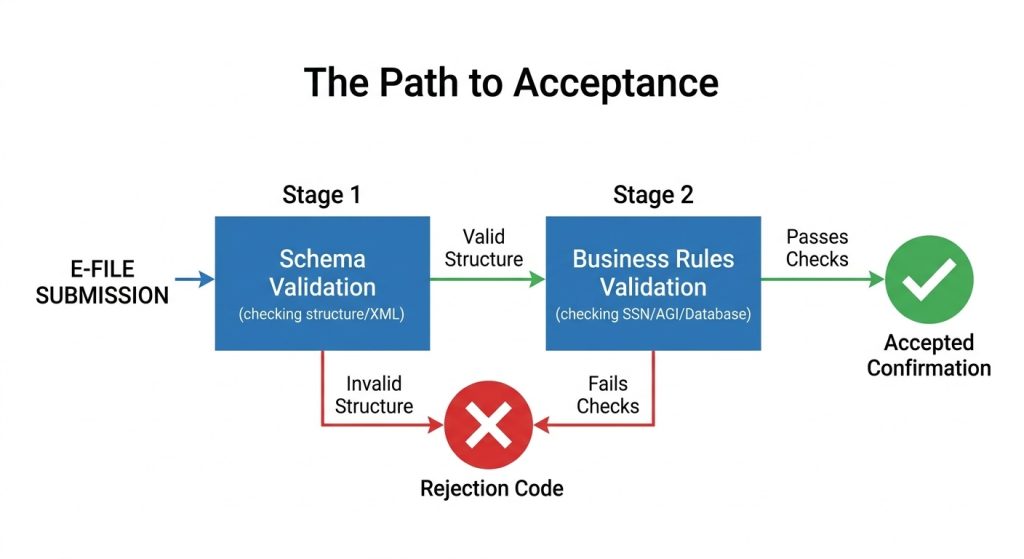
When you submit an e-file, the IRS’s Modernized e-File (MeF) platform runs your return through a two-stage validation:
- Schema Validation – Checks XML structure, required fields, and data formatting
- Business Rules Validation – Cross-references your data against IRS master files (SSN database, prior-year returns, IP PIN registry, and Affordable Care Act records)
If your return passes both stages, you receive an IRS Acceptance Confirmation (typically within 24–48 hours). If it fails, the system instantly returns a rejection code with a brief error description—no human intervention required.
Decode the IRS rejection Code Structure
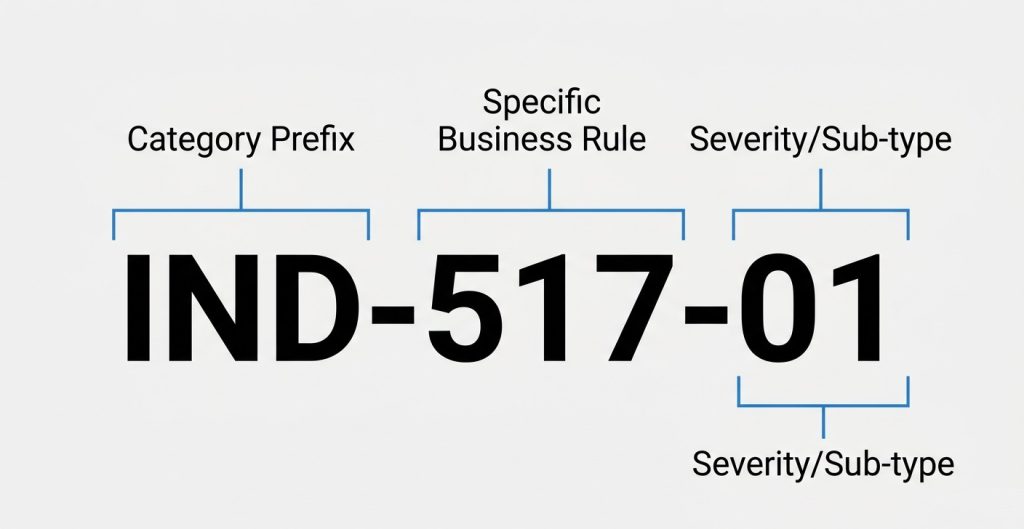
Every IRS rejection code follows a predictable pattern that tells you exactly where the error originated:
| Code Prefix | Error Category | Example |
|---|---|---|
| IND | Individual taxpayer data (SSN, name, DOB, IP PIN) | IND-517-01 |
| DEP | Dependent-related issues (claimed on another return, SSN mismatch) | DEP-001-01 |
| F | Form-specific errors (missing schedules, calculation mismatches) | F8962-070 |
| R | General return-level rejects (duplicate filing, prior-year AGI mismatch) | R0000-500-01 |
| SCH | Schedule-specific validation failures | SCH-A-01 |
The first three digits identify the specific rule violated; the last two digits indicate severity or sub-category.
For example, IND-517-01 means “Social Security Number on return does not match IRS records,” while IND-517-02 would indicate a different variation of the same SSN mismatch scenario.
Soft Tax Rejects vs. Hard Tax Rejects
Not all rejections are created equal. The IRS distinguishes between two types:
- Soft Tax Rejects (Warnings) – Your return can still be transmitted if you acknowledge the error (e.g., unusual deduction ratios, high home office expenses). These appear as alerts, not hard stops.
- Hard Tax Rejects (Blocking Errors) – Your return cannot be filed until the issue is corrected (e.g., invalid SSN, duplicate filing, missing IP PIN). These require immediate action before resubmission.
Understanding which category your code falls into determines your next move: Soft rejects may only need documentation on file, while hard rejects demand data correction before the IRS will accept your transmission.
Why Does This Matters for Your Tax Workflow?
Unlike paper returns, which can sit in processing for 6–8 weeks before errors surface, e-file rejections surface within 24 hours, giving you a narrow window to correct and resubmit before refund delays compound.
But here’s the catch: The rejection code alone doesn’t tell you why the mismatch occurred. A code like R0000-500-01 (SSN/name mismatch) could mean your client entered the wrong number, filed amended returns you don’t know about, or was a victim of identity theft.
That’s why the next section breaks down the 10 most common rejection codes, their root causes, and the exact data points you need to verify before resubmitting.
Identify Common IRS Rejection Codes and Causes [With Quick Fix]
Ten rejection codes account for the vast majority of IRS e-file rejections, with SSN/name mismatches and prior-year AGI errors leading the pack. Tax professionals encounter these daily during peak season—knowing their specific triggers saves hours of client communication and data digging.
10 Most Common IRS Rejection Codes
| IRS Rejection Code | Primary Cause | Quick Fix |
|---|---|---|
| IND-031-04 / IND-032-04 | Prior-year AGI or Self-Select PIN mismatch | Pull exact AGI from IRS Get Transcript Online |
| R0000-500-01 | Primary taxpayer SSN/name doesn’t match the IRS e-File database | Verify SSN and the first 4 letters of the last name against the Social Security card |
| IND-515-01 / R0000-902-01 | Duplicate filing—SSN already used on accepted return | Confirm client hasn’t filed elsewhere; file Form 14039 if identity theft suspected |
| F8962-070 | Form 8962 is missing when IRS records show Form 1095-A issued | Attach Form 8962 or verify 1095-A data entry |
| IND-180-01 / IND-181-01 | Missing or invalid IP PIN for taxpayer/spouse | Retrieve current-year IP PIN from IRS IP PIN Portal |
| IND-507 / DEP-001-01 | Dependent SSN already claimed on another return | Coordinate with other filer (ex-spouse, co-parent); verify custody agreement |
| F1040-524-01 | Date of birth doesn’t match IRS records | Verify DOB against Social Security card; update SSA if needed |
| IND-517-01 | SSN, name, or DOB mismatch in the IRS master file | Cross-check all three fields against SSA records |
| F1040-164-01 | Earned Income Tax Credit claimed without Form 8862 | Attach Form 8862 to claim EIC after prior-year disallowance |
| FW2-502 | Employer EIN/name on W-2 doesn’t match IRS records | Verify W-2 Box b/ein with employer; request corrected W-2 if needed |
Common pattern: IND-031-04 (primary) or IND-032-04 (spouse) triggers when clients round AGI, pull from the wrong tax year, or reference an amended return not yet processed by the IRS.
Explain Why Tax Returns Get Rejected Repeatedly?
A single IRS e-file rejection often triggers a chain reaction—fix one error, resubmit, and get hit with a new code you never saw before.
This “rejection whack-a-mole” happens because the IRS’s Business Rules Check runs your entire return through validation again with each resubmission, surfacing previously hidden errors that were masked by the initial blocking reject.
The Cascade Effect: One Reject Unlocks Three More
When your return hits a hard blocking error like IND-517-01 (SSN mismatch), the IRS stops validation immediately and returns only that first critical error.
But once you correct the SSN and resubmit, the system continues deeper into its 300+ rule checks – now flagging:
- Secondary errors that existed all along (wrong AGI, missing Form 8962)
- New errors introduced during your fix (transposed digits while correcting SSN)
- Timing conflicts (client filed an amended return you didn’t know about)
This creates the illusion that your fix “caused” new rejections, when in reality, you’re just seeing the next layer of pre-existing issues.
Break Down Common IRS Rejection Cycles
| Cycle Pattern | Root Cause | How It Spirals |
|---|---|---|
| AGI Mismatch Loop | Client pulls AGI from the wrong line or year | Fix AGI → New reject shows amended return was filed → Need correct AGI from amended return |
| Dependent Claim Ping-Pong | Two parents claim the same child | Fix by removing dependent → Other parent’s return rejects → IRS holds both returns for manual review |
| IP PIN Timeout | Client enters expired/old IP PIN | Fix with new PIN → Return rejects for missing spouse’s IP PIN → Spouse never enrolled |
| Form 8962 Recalculation Trap | PTC error corrected, but Form 1040 not updated | Fix 8962 → New math error on 1040 Line 46 → Requires full return recalculation |
| Name Control Drift | Client’s name changed mid-season (marriage/divorce) | Fix SSN → Name control mismatch → SSA records not updated yet |
Identify Why Quick Fixes Cause Repeat Rejections
Speed over accuracy is the #1 driver of repeat rejections. When tax teams rush to meet client deadlines, they often:
- Patch the specific error without auditing the rest of the return for related issues
- Use client-provided data (like AGI from memory) instead of pulling IRS transcripts
- Resubmit immediately without waiting for SSA/IRS database updates to propagate
The IRS’s system has a 24-48 hour lag for certain database updates (like SSA name changes or new IP PINs). Resubmitting before that window closes guarantees another rejection, even if your correction was technically correct.
How to Fix IRS Rejection Codes? [Step-by-Step]
Fixing an IRS e-file rejection isn’t about patching one error; it’s about running a targeted audit that prevents the next three rejects before you resubmit.
Follow this exact workflow to break the rejection cycle and get your return accepted on the first resubmission.
Follow the 7-Step IRS Rejection Resolution Workflow
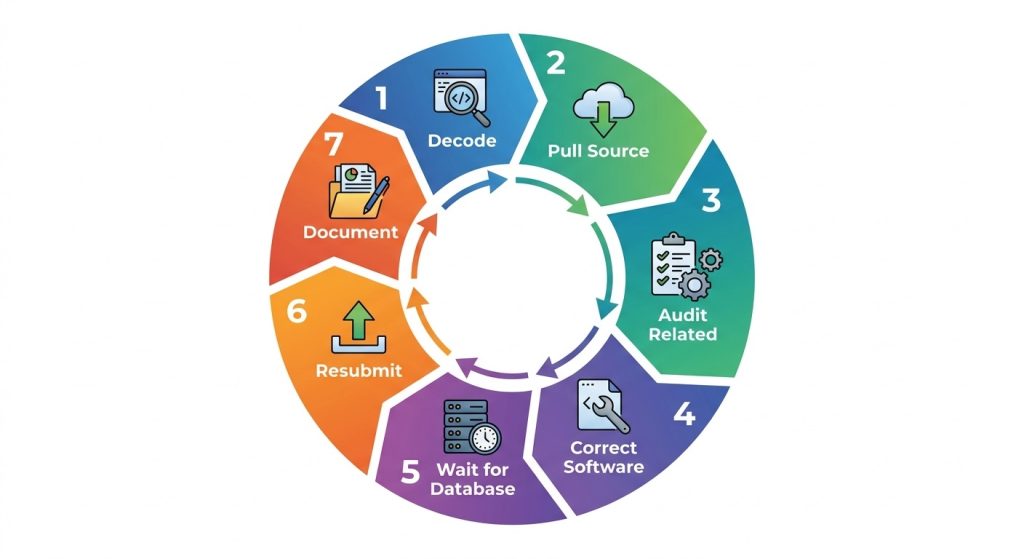
Step 1: Decode the Rejection Code Fully
- Don’t just read the error message – pull the full code description from your tax software’s rejection database or the IRS MeF Business Rules
- Identify the error category: Identity (IND), Prior-Year Data (R), Dependent (DEP), or Form-Specific (F)
- Note the severity: Hard reject (must fix) vs. soft reject (can override with documentation)
Step 2: Pull the Source Data, Don’t Trust Client Memory
- AGI mismatches (IND-031-04 / IND-032-04): Log into IRS Get Transcript Online and pull the exact “Adjusted Gross Income” line from the accepted prior-year return—never use the client’s copy or rounded number.
- SSN/name mismatches (R0000-500-01 / IND-517-01): Have the client verify their Social Security card spelling and DOB; cross-check with SSA’s mySocialSecurity if discrepancies persist
- IP PIN errors (IND-180-01 / IND-181-01): Client must retrieve current-year PIN from IRS IP PIN Portal – old PINs expire December 31
Step 3: Audit Related Fields for Cascade Errors
Before fixing the flagged error, scan these high-risk adjacent fields:
- If fixing AGI → Check filing status, dependents, and Form 8962 PTC calculations
- If fixing SSN → Verify spouse’s SSN, all dependent SSNs, and IP PINs
- If fixing Form 8962 → Recalculate Form 1040 Lines 1-28 for math consistency
Step 4: Make the Correction in Your Tax Software
- Enter the exact value from the authoritative source (IRS transcript, SSA card, IP PIN letter)
- Let your software recalculate the entire return—don’t manually override totals
- Run the software’s built-in “error check” or “diagnostic” before exporting
Step 5: Wait for Database Propagation (Critical Step)
- SSA name/DOB updates: Wait 48-72 hours after the client updates SSA records before resubmitting
- New IP PINs: Wait 24 hours after generation before using in e-file
- Amended return processing: If client filed 1040-X, wait for IRS to fully process before pulling new AGI (can take 6-8 weeks)
Step 6: Resubmit with a Clean Transmission
- Delete the old rejected return from your software’s e-file queue
- Generate a fresh XML transmission (don’t reuse old files)
- Monitor acknowledgment within 24 hours—set up auto-alerts in your tax software
Step 7: Document the Fix for Future Seasons
- Add a client note: “AGI sourced from 2024 IRS Transcript, Line 11, $XX, XXX.XX”
- Flag accounts with recurring issues (name changes, shared dependents, identity theft history)
- Update your intake checklist to capture this data proactively next year
Use the IRS Rejection Code Quick Fix Cheat Sheet
| Reject Category | First Action | Source to Pull | Wait Time Before Resubmit |
|---|---|---|---|
| IND (Identity) | Verify SS card + SSA records | SSA myAccount or client’s physical card | 48-72 hrs if SSA updated |
| R (Prior-Year) | Pull the IRS transcript | IRS Get Transcript Online | Immediate (if no amendment pending) |
| DEP (Dependent) | Confirm who has a custody agreement | Client’s divorce decree or Form 8332 | Immediate |
| F (Form-Specific) | Recalculate form line-by-line | Form instructions + source docs (1095-A, W-2) | Immediate |
| IP PIN | Retrieve current PIN | IRS IP PIN Portal | 24 hrs after generation |
Escalate IRS Rejection Issues When Needed
Some rejections can’t be fixed through normal resubmission:
- Duplicate filing alerts (R0000-002, IND-515-01): Client may be an identity theft victim—file Form 14039 and call the IRS Identity Protection Specialized Unit at 800-908-4490
- Persistent AGI mismatches after transcript verification: IRS may have unprocessed amended return—call 800-829-1040 with transcript in hand
- Systemic software errors: Check the IRS Known Issues page before assuming client data error
This workflow stops the rejection spiral – but the real win is preventing rejects before they happen, which is exactly what the next section covers with pre-filing automation checklists.
How to Prevent IRS e-File Errors Before Filing?
The only way to truly beat IRS e-file rejections is to catch them before your return ever leaves your software – running the same validation checks the IRS will run, but on your timeline, not theirs.
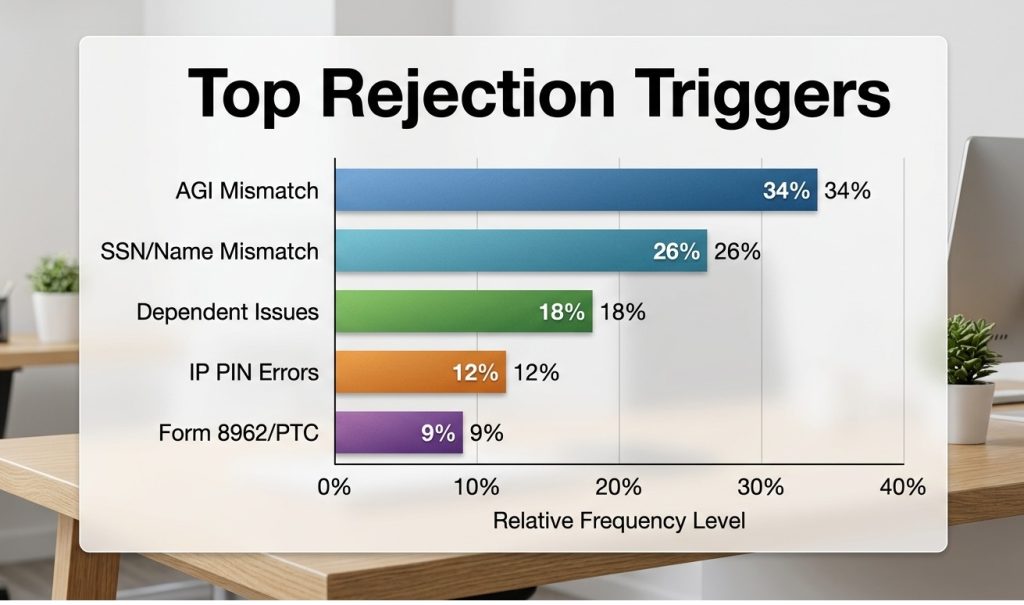
Pre-filing prevention dramatically reduces rejection rates by catching data mismatches, missing forms, and calculation errors before transmission.
Run Pre-Filing IRS Validation Checklist
Run these checks before hitting “Transmit” on any return. Each one mirrors an IRS Business Rule that triggers hard rejects.
- SSN & Name Control Match
- Verify every SSN against the client’s physical Social Security card (not last year’s return)
- Confirm first four letters of last name match SSA records exactly (no nicknames, no typos)
- Flag any client with recent name changes (marriage, divorce) for manual SSA verification
- Prior-Year AGI Verification
- Pull the exact AGI from IRS Get Transcript Online for every returning client
- Never accept client-provided AGI from memory, W-2s, or old tax copies
- For first-time filers, enter “0” as AGI—not blank, not “N/A.”
- Dependent SSN Cross-Check
- Run a “duplicate dependent” scan across your entire client database
- Ask divorcing/separating clients explicitly: “Who is claiming the children this year?”
- Require Form 8332 or custody agreement before entering a dependent you didn’t claim last year
- IP PIN Enrollment Confirmation
- Ask every client: “Did you receive an IP PIN letter from the IRS this year?”
- For clients with prior identity theft flags, verify PIN enrollment status before January 15
- Never leave the IP PIN field blank—if missing, retrieve it before filing
- Form 8962 & 1095-A Reconciliation
- Match every Form 1095-A policy number to the corresponding 8962 entry
- Recalculate PTC if the client’s income changed significantly from the estimate to the actual
- Flag households with income near 400% FPL for manual 8962 review (common calculation trap)
- Math & Cross-Form Consistency Scan
- Run your tax software’s full diagnostic/error check (don’t skip this step)
- Verify that Form 8962 Line 24 matches Form 1040 Line 46 exactly
- Check that Schedule 1 totals flow correctly to Form 1040 Lines 8-10
- Duplicate Filing History Check
- Ask: “Have you filed any tax returns this year already?” (catches client self-filing attempts)
- Ask: “Did you file an amended return (1040-X) in the last 6 months?”
- Check your software’s client notes for prior-year rejection flags
Apply 24-Hour Pre-Transmission Rule
Never transmit a return within 24 hours of receiving critical client data. This buffer lets you:
- Wait for SSA database updates to propagate (name changes, new SSNs)
- Verify IP PINs generated that same day (IRS system has a processing lag)
- Catch client-provided errors (wrong AGI, missing 1095-A) before they become rejects
Firms that enforce this rule report significantly fewer repeat rejections during peak weeks.
How to Improve Tax Workflow Accuracy and Efficiency
Every rejected return is more than a delay; it’s a signal that your current workflow depends too heavily on manual validation, disconnected data, and last-minute corrections.
High-performing CPA firms don’t just fix errors faster; they design systems where those errors rarely reach submission in the first place.
That shift requires:
- Structured validation embedded in the workflow
- Consistent data handling across returns
- Visibility into recurring error patterns
- Automation that supports accuracy without slowing teams down
This is where CPA Pilot fits into the modern tax workflow.
Instead of reacting to tax filing issues, CPA Pilot helps firms:
- Validate tax data before submission
- Identify inconsistencies across returns
- Automate research and preparation workflows
- Reduce manual effort during peak filing periods
The result is simple: Fewer disruptions, faster turnaround, and more time spent on advisory work instead of corrections.
See How CPA Pilot Reduces Filing Errors
If your team is still spending time resolving the same filing issues repeatedly, it’s time to move toward a more reliable system.
Explore how CPA Pilot helps streamline tax preparation and reduce validation errors:
Book a 30-minute demo and experience the difference!!!
Answer FAQs About IRS Rejection Codes
How long does it take for the IRS to reject or accept an e-filed return?
The IRS system typically returns an acknowledgment within minutes. The system processes submission → validates return → issues acceptance or rejection status, though peak filing periods can slightly delay responses.
Can a rejected tax return be filed again without changes?
No. A rejected return is not considered filed, and the IRS will reject it again with the same code if resubmitted unchanged. You must correct the specific error identified by the rejection code, revalidate the return in your tax software, and resubmit as a new transmission.
What happens if a return keeps getting rejected multiple times?
Repeated rejections indicate unresolved validation issues. The filing process requires identifying root cause → correcting underlying data → ensuring consistency before resubmission to avoid repeated failures.
Do IRS rejection codes affect tax deadlines or penalties?
A rejected return is not considered filed. The IRS treats submission as incomplete → requires correction and acceptance before the deadline to avoid late filing penalties.
When should a CPA stop resubmitting and choose an alternative filing method?
If electronic submission repeatedly fails, the filing process may require switching to paper filing. The CPA evaluates rejection pattern → confirms resolution limits → submits through an alternative method if needed.